
All blogs
API Development
Webhooks vs APIs: Key Differences
Compare webhooks (push) vs APIs (pull): when to use each, security, retries, and combining both.
8 min read

Webhooks vs APIs: Key Differences
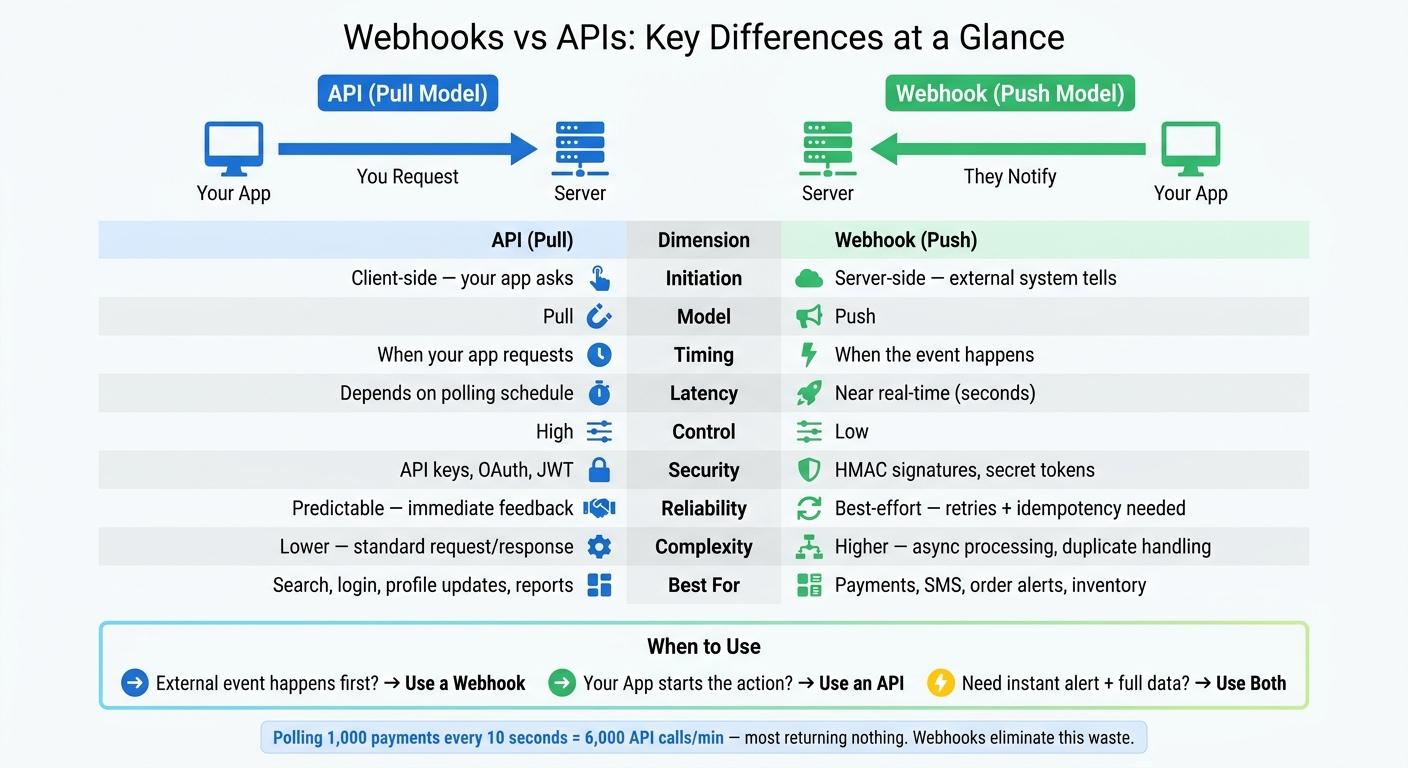
If you need updates the moment something happens, use webhooks. If your app needs to ask for data or make changes on demand, use APIs. In many cases, I’d use both.
Here’s the short version:
- APIs use a pull model: your app sends a request and gets a response.
- Webhooks use a push model: another system sends your app an event when something happens.
- Webhooks cut waste when events are unpredictable. Polling every 10 seconds across 1,000 payments leads to 6,000 API calls per minute, and most may return nothing new.
- APIs give more control over timing, queries, filters, pagination, and write actions like create, update, and delete.
- Webhooks need more setup on your side, including signature checks, retry handling, and idempotency.
- A common pattern is both: a webhook triggers the flow, an API fetches extra details, and a scheduled sync checks for anything missed.
If I were choosing fast, I’d use this rule:
- External event happens first? Use a webhook.
- User or app starts the action? Use an API.
- Need alert + full record data? Use both.
API vs Webhook: What's the Difference? (Pull vs Push Explained Simply) | API vs Webhook.
sbb-itb-622dc24
Quick Comparison
| Criteria | API | Webhook |
|---|---|---|
| How it starts | Your app sends the request | The provider sends the event |
| Model | Pull | Push |
| Timing | When your app asks | When the event happens |
| Latency | Depends on polling schedule | Near real-time |
| Control | Higher | Lower |
| Common use | Search, login, profile updates, reports | Payments, SMS, order updates, alerts |
| Security | API keys, OAuth, JWT | HMAC signature checks, shared secret |
| Failure handling | Immediate response | Retries, duplicate delivery handling |
| Setup effort | Lower | Higher |
In plain terms: APIs are for asking. Webhooks are for listening. That one difference shapes speed, cost, battery use, rate-limit pressure, and how much logic you need on the back end.
How Webhooks and APIs Work
How Webhooks Send Event-Driven Updates
With webhooks, the provider sends the update first. Your app registers a URL and subscribes to certain events. When one of those events happens, the provider sends an HTTP POST with a JSON payload that includes the event details. That's the push model in action.
One best practice is simple: return HTTP 200 OK right away, then handle the payload asynchronously, such as through a message queue. That helps you avoid timeouts and keeps the endpoint from getting bogged down.
Two safeguards matter early on: HMAC signature verification and idempotency. Signature checks help confirm the payload came from the right source and wasn’t changed in transit. Idempotency makes sure the same event doesn’t get processed twice when a provider retries delivery.
The upside of this push model is speed. The tradeoff is that you have less control than you do with a request-based API.
How APIs Handle On-Demand Requests
APIs work in a more direct, request-based way. Your app decides when to send a request, what data it wants, and how often it should ask. The server responds only after your app makes that request.
This request-response pattern runs over HTTP and uses standard methods:
- GET reads data
- POST creates something new
- PUT/PATCH updates an existing resource
- DELETE removes it
APIs can also support filtering, pagination, and sorting. Webhook payloads, by contrast, are usually fixed.
For access control, APIs often use API keys, OAuth, or JWT. One catch: frequent polling can burn through rate limits fast, so request volume should be part of your integration design from the start.
That extra control makes APIs a better fit for on-demand data, but not the best choice when you need to keep checking for constant updates.
Webhooks vs APIs: Key Differences
Communication, Timing, and Control
Once you see how both work, the choice comes down to control vs. immediacy.
The main difference is simple: who starts the exchange? With an API, your app makes the request. With a webhook, the server sends the update when the event happens.
APIs let your app decide what to fetch and when to fetch it. Webhooks give up some of that control for speed, sending updates within seconds of an event. That tradeoff affects latency, cost, and how up-to-date your app’s data stays.
Security, Reliability, and Implementation Complexity
APIs authenticate the requester. In plain English, your app proves who it is with API keys, OAuth tokens, or JWTs before the server sends anything back. Webhooks work the other way around: your app gets an incoming request and has to verify the sender by checking an HMAC signature against a shared secret. Same goal, different direction: requester authentication vs. sender verification.
Reliability works differently too. APIs usually give you an immediate success or failure response. Webhooks are more like event delivery with retries, which means duplicate events can show up. So your receiver needs idempotency logic to deal with that without breaking things.
Here’s the side-by-side view:
| Dimension | API (Pull) | Webhook (Push) |
|---|---|---|
| Initiation | Client-side (your app asks) | Server-side (external system tells) |
| Data Flow | Client requests and modifies resources | Server sends event data to a receiver |
| Latency | Depends on polling frequency | Near real-time (seconds) |
| Control | High | Low |
| Security Pattern | API keys, OAuth, JWT | HMAC signatures, secret tokens |
| Reliability | Predictable (immediate feedback) | Best-effort (requires retries + idempotency) |
| Complexity | Lower (standard request/response) | Higher (receiving endpoint, duplicate handling, async processing) |
| Ideal Scenario | Fetching a user profile on login | Notifying a user of a successful payment |
One practical difference shows up during debugging. API failures usually appear right away. Webhook failures often send you digging through both provider logs and receiver logs.
Those differences are what shape where each pattern makes sense.
When to Use Webhooks, APIs, or Both
Now let’s apply the control vs. immediacy idea to actual app tasks.
Best Use Cases for Webhooks
Use webhooks when something happens outside your app and you need to react fast. Payment confirmations are the clearest example. When a payment processor marks a charge as successful, a webhook can fire within seconds so your app can unlock access right away.
The same logic works for order updates, inbound SMS, inventory alerts, and CRM notifications. These events are unpredictable. You don’t know when they’ll happen, so polling for them means wasting compute and chewing through rate limits just to get empty responses most of the time.
Best Use Cases for APIs
Use APIs when your app starts the action. If a user taps “Search,” logs in, updates a profile, or submits a form, that’s an API call.
APIs also handle jobs that webhooks can’t. That includes creating records, updating subscriptions, deleting data, and paging through large datasets. If you need a customer’s full order history with filters applied, that’s an API query. Scheduled jobs like monthly reports and batch syncs fit here too, because the timing is known and the data needs structured queries.
Using Webhooks and APIs Together in Mobile, Web, and AI Apps
In most production flows, the answer isn’t one or the other. It’s both.
A webhook acts as the trigger, an API call adds the extra details, and a scheduled API sync handles reconciliation. This trigger-enrich-reconcile pattern helps webhook-based flows stay dependable.
Here’s a simple example: a payment webhook tells your app that a transaction succeeded, but your app still calls the payment provider’s API to pull the full details before it updates the user’s account. You’ll see this pattern across mobile apps, web platforms, and AI-powered apps, where AI agents more often consume APIs on their own.
| Use Case | Best Tool | Why |
|---|---|---|
| Payment confirmation | Webhook | Instant notification needed to unlock access |
| User profile update | API | User-initiated; needs immediate confirmation |
| Inventory threshold alert | Webhook | Unpredictable event; polling is inefficient |
| Monthly report generation | API | Scheduled; needs filtered, paginated data |
| New inbound SMS | Webhook | Fast reaction to external communication |
Implementation Priorities and Final Takeaways
Once you've picked an integration pattern, the next job is making sure it holds up in production.
What to Plan for Before Choosing
Before you choose a pattern, plan for security, failure handling, and observability.
Security. Use OAuth, API keys, or JWT for APIs. For webhooks, verify the HMAC signature on the raw body, add timestamp checks, and block replay attempts.
Traffic spikes and failed deliveries. Webhooks can hit in bursts. To handle that, buffer spikes with a durable queue, send failed deliveries to a dead letter queue, and process events asynchronously after returning 200 OK.
Standardize payloads. Use ISO 8601 UTC timestamps. Then format dates for users in the app layer.
Logging. Log request IDs, delivery attempts, latency, and retries. Use correlation IDs to trace a single event across services. This matters because webhook failures can be silent.
With the day-to-day ops covered, the choice comes down to one plain idea: who kicks things off?
Conclusion: A Simple Rule for Deciding
Use one question to decide: who starts the action?
Choose webhooks for external events, APIs for app-initiated requests, and both when you need instant alerts plus full data retrieval.
FAQs
Can webhooks completely replace APIs?
No. Webhooks and APIs do different jobs.
Webhooks automatically send real-time event notifications, which makes them handy for instant updates. APIs work on a request-response model, so they’re better for on-demand data retrieval, data changes, and more involved interactions.
In most systems, webhooks complement APIs rather than replace them.
How do I choose between polling and webhooks?
Choose based on how fast your app needs to respond. Polling checks for updates on a schedule, so it can introduce delays and consume resources even when nothing has changed. Webhooks send event-driven notifications within seconds, which makes them a better fit for near real-time updates.
If delays of minutes or hours are fine, or the source system doesn’t support webhooks, polling may be enough. A common setup is to use webhooks for alerts and APIs for data retrieval and reconciliation.
What should I secure first in a webhook setup?
Secure your webhook endpoint first. Use signature verification, HTTPS, IP allowlisting, and timestamp checks to help prevent spoofing and replay attacks.
More from the studio

