
All blogs
Mobile App Development
Rewarded Video Ads: QA Checklist for Agent Teams
QA checklist for rewarded video ads covering rules, failure injection, on-device tests, ledger reconciliation, and release controls.
7 min read

Rewarded Video Ads: QA Checklist for Agent Teams
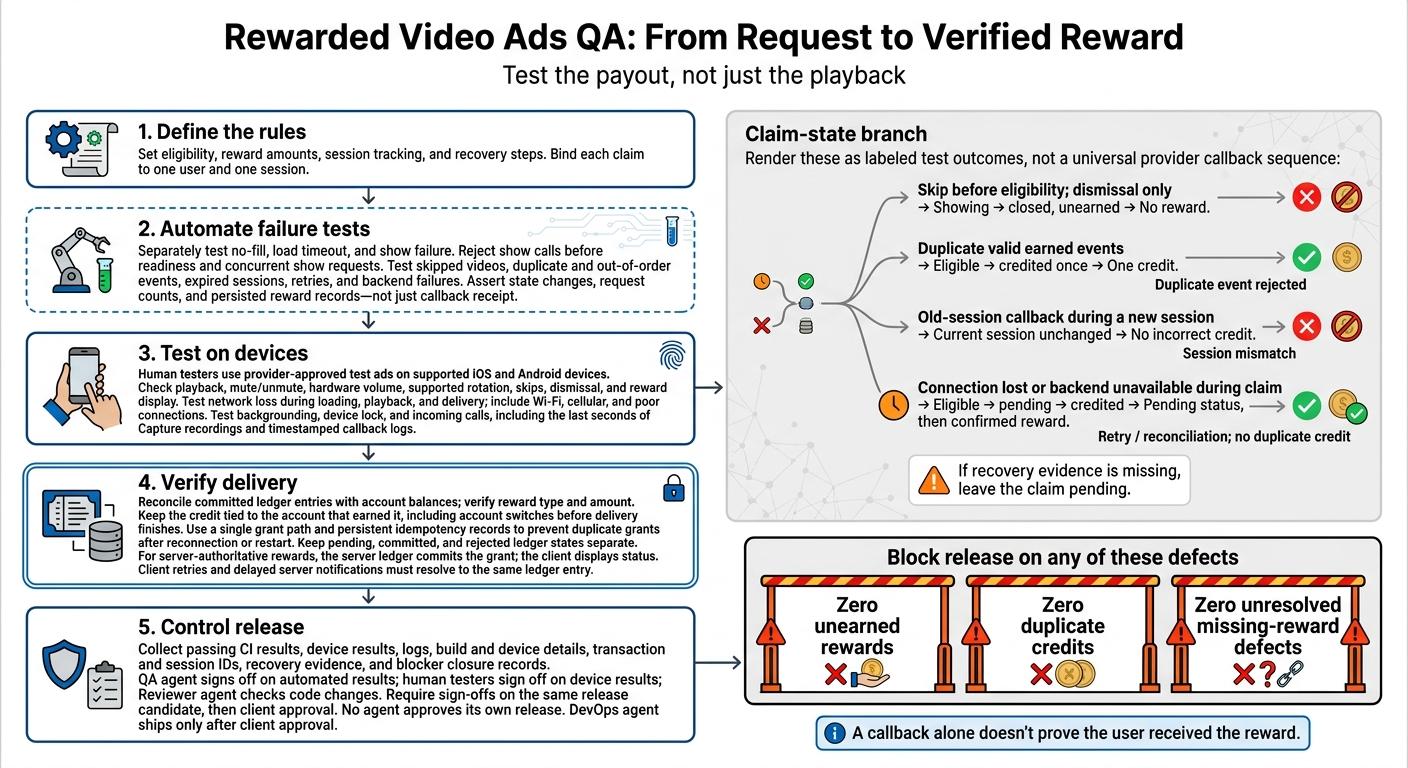
I use three release gates for rewarded video ads: zero unearned rewards, zero duplicate credits, and zero unresolved missing-reward defects. A callback alone doesn’t prove the user received the reward.
My checklist covers the full path from ad request to account balance:
- Define the rules: Set eligibility, reward amounts, session tracking, and recovery steps.
- Automate failure tests: Check failed loads, repeated callbacks, expired sessions, and retries.
- Test on devices: Use provider-approved test ads to check playback, skips, network loss, and interruptions.
- Verify delivery: Match ledger records to balances, keep claims tied to the right account, and use one grant path.
- Control release: Collect test records, close blockers, and require human sign-off and client approval before shipping.
My rule: <u>test the payout, not just the playback</u> - and keep valid claims pending until delivery is confirmed.
Unity Rewarded Ads in Unity 6 (2026) | Mobile Ads Masterclass #8
sbb-itb-622dc24
Automated QA Agent Checklist
Use this checklist in CI to test the failure paths in the lifecycle matrix. Run repeatable checks with mocked provider responses and backend failures. Assert state changes, request counts, and persisted reward records - not just callback receipt.
Test Ad Loading and Recovery
Test no-fill, load timeout, and show failure separately. Each outcome must clear stale ad state and readiness flags. Reject show calls before the ad is ready and reject concurrent show requests.
When the connection drops, enforce the configured retry limit and backoff. Confirm that repeated taps can't start another retry loop.
Ignore late callbacks from failed load sessions. They must not change app state or revive an expired ad session. Check that loading controls reset after failure and that users can retry when appropriate.
Test Callback and Session Failures
Accept reward eligibility only when callbacks follow the expected sequence. Inject skipped videos, duplicate and out-of-order events, and callbacks from expired sessions.
Bind each claim to one user and one session. An expired session must never credit the active session, and valid pending claims must remain recoverable. Use the same session ID in every assertion to keep callback order and credit rules traceable.
| Injected condition | Expected logs | Expected state transition | User outcome |
|---|---|---|---|
| Skip before eligibility; dismissal only | Ineligible dismissal; no grant | Showing → closed, unearned | No reward |
| Duplicate valid earned events | Duplicate event rejected | Eligible → credited once | One credit |
| Old-session callback during a new session | Session mismatch | Current session unchanged | No incorrect credit |
| Connection lost or backend unavailable during claim | Pending; retry | Eligible → pending → credited | Pending status, then confirmed reward |
After connection loss or backend failure, verify that recovery doesn't issue duplicate credit. If recovery evidence is missing, leave the claim pending.
Human On-Device Test Checklist
After automated failure injection, have human testers check playback, visuals, and timing with provider-approved test ads on supported iOS and Android devices. Record what the SDK actually does, then give the QA agent recordings and callback logs to investigate failures. These checks cover real-device behavior that automated agents can’t fully simulate.
Check Playback, Skips, and Reward Display
Confirm playback starts, then test mute/unmute, hardware volume, and supported screen rotation. Watch for clipped video, overlapping controls, and audio that ignores app settings.
Tap close controls at different stages, and try rapid taps around dismissal. Check UI timing and recovery: loading indicators, retry controls, and error messages must allow users to exit failed ads.
Check skips and completed playback against the documented eligibility event for that placement. Confirm the post-ad message displays the correct reward exactly once.
Test Network and Device Interruptions
Disable and restore connectivity during loading, playback, and reward delivery. Repeat on Wi-Fi, cellular, and a poor connection. Confirm playback resumes or fails cleanly and the app returns to a usable state. Recovery must not grant another reward, and any pending reward must stay pending until the callback or backend confirms it.
Background the app, lock the device, and trigger an incoming call. Include interruptions during the last seconds of playback. Test returning to the foreground and supported screen rotation. Confirm the app returns to a usable screen and the reward status stays correct.
Capture the network type, battery level, recordings, and timestamped callback logs.
Reward Delivery and Data Integrity Checklist
Check that the reward ledger records the intended account, placement, reward type, amount, timestamp, eligibility evidence, and status. Store provider transaction IDs and app-generated session IDs in separate fields, and record both when available. An internal session ID does not prove payout. Keep secrets and unnecessary personal data out of logs.
Check Reward Accuracy and Reconciliation
After callback and retry testing, have the QA agent reconcile committed ledger entries with account balances, replay callbacks and retry attempts, and check for missing grants after eligible events. Verify each reward’s type and amount. Persistent idempotency records must prevent duplicate grants after reconnection or restart. Where applicable, save the reward and ledger entry atomically.
Have human testers switch accounts before delivery finishes. Confirm that the credit stays tied to the account that earned it. Keep pending, committed, and rejected states separate in the ledger.
Define Client and Server Responsibilities
With the ledger defined, separate local status updates from the source that credits rewards. Use a single grant path. For server-verified rewards, credit only through the server ledger. Where server-side verification is supported, validate provider signatures, transaction IDs, account binding, and duplicate notifications. Client-only validation is not server proof; document that limit.
| Task | Client responsibility | Server responsibility |
|---|---|---|
| Event recording | Record app session ID and timestamp | Store provider transaction IDs, account binding, and status |
| Eligibility validation | Report the SDK completion callback | Verify supported provider evidence and transaction uniqueness |
| Reward grants | Display pending or confirmed status | Commit the authoritative grant and persistent idempotency record |
| Delivery retries | Request reconciliation after restart or reconnection | Return the existing status or finish a pending grant without granting twice |
For server-authoritative rewards, the client callback should update status - not credit the balance on its own. Have the QA agent verify that client retries and delayed server notifications resolve to the same ledger entry. Human testers should confirm that the app displays that same status.
Release Approval Checklist
Require the QA agent and human testers to sign off on the same release candidate, then get client approval. After testing and reconciliation, block release on any unearned reward, duplicate grant, or unresolved missing-reward defect. Record the decision with the evidence below.
Collect Release Test Evidence
- Attach passing CI results that confirm deterministic behavior, plus device results that confirm correct interaction, recovery, and rewards.
- Include logs, build and device details, and transaction and session IDs. Add reproduction steps if those records alone aren't enough to reproduce a failure.
- Log each event separately for auditing: load failure, show failure, dismissal, earned reward, reward processing, and verification failure.
- Include evidence of recovery after reconnection and closure records for blockers involving skipped videos, failed loads, duplicate callbacks, lost connections, and missing rewards.
- Verify production placement configuration only through provider-approved live-ad methods.
Once the evidence is complete, assign ownership of the final review and release.
Assign Review and Release Roles
At Appeneure, the QA agent signs off on automated results, human testers sign off on device results, and the Reviewer agent checks code changes. Record QA sign-offs and blocker closure before client approval.
No agent approves its own release. The DevOps agent ships only after client approval.
FAQs
How can we distinguish a skipped ad from interrupted playback?
Log detailed events in your ad mediation layer. A skipped ad typically triggers a user-initiated event or an early-close callback. Interrupted playback usually involves system events, such as a lost connection, an incoming call, or the app moving to the background.
Have your QA agent automate checks to confirm that callbacks distinguish these states, onUserEarnedReward fires only after successful completion, and error logs record why sessions were incomplete.
How long should a missing reward stay pending?
The documentation doesn’t state how long a missing reward must remain pending. Use automated checks and manual verification to track missing rewards and keep data consistent.
Your technical team should handle these issues through your established defect management process, setting priorities based on their impact on user experience and retention.
How should QA agents and human testers investigate conflicting results?
Put human review first when results conflict. Compare automated logs with manual observations on the device. Use human judgment to check the context, including failed loads or duplicate callbacks that automated checks may misread.
Use the Three Amigos approach - collaboration among the tester, developer, and product owner - to clarify requirements and acceptance criteria. Send complex or unclear cases for human review. Treat QA agents as collaborators, not the final authority.
More from the studio

