
All blogs
Mobile App Development
How to Reduce Churn in Subscription Apps
Diagnose why users leave and reduce subscription-app churn with better onboarding, payment recovery, personalization, flexible pricing and community support.
17 min read
How to Reduce Churn in Subscription Apps
Reducing churn in subscription apps is all about keeping users engaged, solving their problems, and ensuring they see value in your app. Here’s a quick breakdown of how to tackle churn effectively:
- Understand Why Users Leave: Use exit surveys and behavior analysis to identify why users cancel. Common reasons include insufficient usage, high costs, or technical issues.
- Fix Payment Issues: Involuntary churn (like failed payments) accounts for up to 40% of cancellations. Automated retries, reminders, and multiple payment options can help recover lost revenue.
- Improve Onboarding: Simplify the onboarding process to help users quickly experience your app’s value. Focus on one key feature at a time and avoid overwhelming new users.
- Personalize the Experience: Tailor content and features based on user preferences. Use data to send relevant notifications and introduce advanced features gradually.
- Offer Pricing Flexibility: Provide downgrade options, subscription pauses, or regional pricing to retain cost-sensitive users.
- Build Community and Support: Create spaces for users to connect and ensure quick, helpful customer support to address frustrations early.
Key Stats:
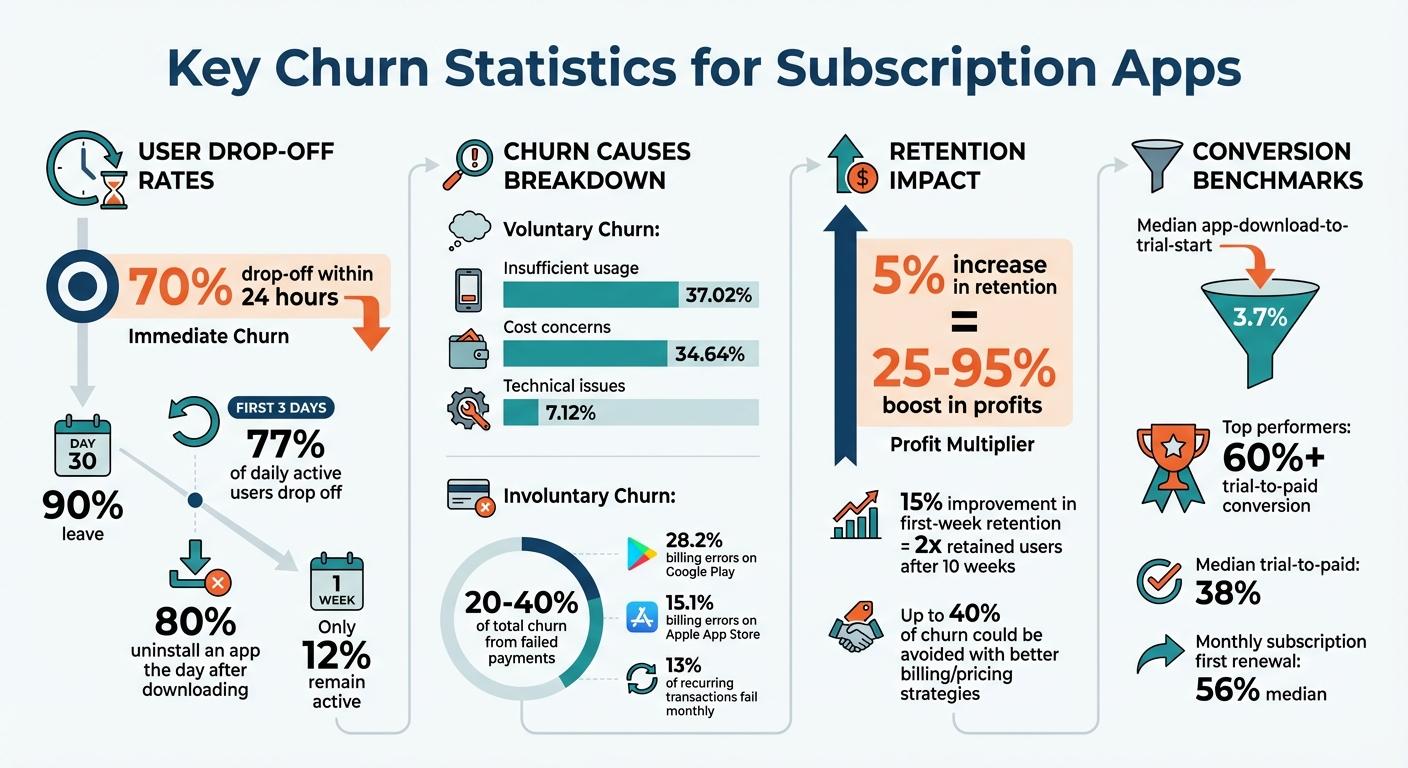
- 70% of users drop off within 24 hours, and 90% leave by Day 30.
- A 5% increase in retention can boost profits by 25%–95%.
- Up to 23% of churn is caused by billing errors.
By addressing these pain points, you can retain more users, reduce acquisition costs, and boost long-term revenue.
How to fight churn and improve your app's growth
sbb-itb-622dc24
Step 1: Find Out Why Users Are Leaving
Understanding the reasons behind cancellations is key. Before diving into retention strategies, take a step back and figure out why users are leaving. The numbers paint a clear picture: 37.02% unsubscribe due to insufficient usage, 34.64% cite cost concerns, and 7.12% leave because of technical issues. While these categories give you an overview, they don’t explain the specific pain points in your app. To get to the root of the issue, you need to dig deeper.
Gathering feedback at the time of cancellation is essential. Pair this direct input with behavioral data to uncover patterns - what users did (or didn’t do) before canceling. This combination helps you understand both the "what" and the "why", laying the groundwork for more in-depth analysis of user behavior and reviews.
Use Exit Surveys to Capture Feedback
Timing is everything when it comes to exit surveys. Deploy in-app surveys immediately when a user cancels to capture feedback while the experience is still fresh. Waiting and sending email surveys days later often results in fewer responses and less accurate insights, as users tend to rationalize their decisions over time.
Keep the survey short and to the point - one or two questions max. Start with a multiple-choice question addressing common reasons for cancellation, such as insufficient usage, cost concerns, switching to a competitor, or technical issues. Follow up with an open-ended question like, "What could we do to improve?" to uncover specific gaps or features users might be looking for.
Randomize the order of multiple-choice options to avoid biases like primacy or recency. If more than 5% of users select "Other", it’s a sign that your predefined categories might need updating.
Here’s how companies have put this into action: In 2024, pliability discovered through cancellation surveys that users were leaving because they didn’t have time for a daily routine. By introducing shorter modules, they reduced churn by over 20% within a year. Similarly, Unbounce used dynamic cancellation surveys to create personalized retention offers. This approach helped them deflect 11% of cancellations, as Max Tims, their former Director of Revenue Ops and Strategy, explained:
"Now we understand that when a customer hits cancel, they're raising their hand for a lifeline. With Chargebee Retention, we're able to deflect 11% of cancellations by being there for our customers when that hand goes up."
Analyze User Behavior and Reviews
Surveys give you opinions, but analytics reveal actions. To complement user feedback, dive into behavioral data. Look at engagement metrics like session frequency, session length, and interactions with key features in the weeks leading up to a cancellation. A noticeable drop in these metrics can act as an early warning sign.
Cohort analysis is another powerful tool. Group users based on specific behaviors to identify patterns. For instance, in 2024, Calm found that users who frequently used the "reminders" feature were far less likely to churn. By making this feature more prominent, they tripled their retention rates. Similarly, the fintech app Dave discovered that users who added more recurring expenses during onboarding stayed longer. By encouraging more users to add expenses upfront, they boosted retention by 5.7%.
Don’t overlook app store reviews and customer support tickets. These channels often highlight recurring issues or frustrations that exit surveys might miss. Vince Mayfield, CEO of Talking Parents, emphasized the importance of listening to users:
"If they feel like they're heard and that we're listening to them, they're gonna continue to stay on a subscription with us, and we're gonna have great retention rates."
Lastly, make sure to differentiate between voluntary and involuntary churn. For example, billing errors - like expired cards or insufficient funds - account for 28.2% of cancellations on Google Play and 15.1% on the Apple App Store. These cases don’t necessarily require product changes but highlight the need for a more robust payment system.
Step 2: Improve the User Experience
Once you’ve identified why users leave, the next step is to refine your app to keep them engaged. A poor user experience can drive users away quickly. The stats don’t lie: 77% of daily active users drop off within the first three days, and 90% leave within 30 days. Even more alarming, 80% of users uninstall an app the day after downloading it, leaving only 12% active after a week. But here’s the good news: improving first-week retention by just 15% can nearly double your retained users after 10 weeks.
The goal? Remove friction at every step. From onboarding to day-to-day usage, every interaction should feel smooth and tailored to the user. When people quickly understand your app’s value and see content that aligns with their needs, they’re far more likely to stick around.
Simplify Your Onboarding Process
Your onboarding process should help users reach their "Aha!" moment - the point where they clearly see your app’s core value - as quickly as possible. With a median app-download-to-trial-start conversion rate of just 3.7%, most users don’t even make it past the starting line. Complicated steps, unclear instructions, or unnecessary requests can drive them away.
Focus on one high-value task during the first session. For example, Slack’s onboarding prioritizes helping users create their first workspace, leaving other features for later. This approach lowers the mental effort required and gets users involved faster.
Don’t ask for too much upfront. Instead, let users experience the app’s value first. Tools like progress bars or milestones can ease anxiety and encourage users to complete setup.
Choose the right onboarding style for your app. For complex tools like video editors, a function-oriented approach works best. Lifestyle or wellness apps benefit from highlighting advantages, while progressive onboarding introduces features step-by-step.
The results speak for themselves. NBC saw its Day 7 retention numbers double after using funnel analysis and A/B testing to redesign its homepage for new users. Similarly, the banking app Dave improved retention by 5.7% by encouraging users to add recurring expenses during onboarding.
Performance is another critical factor. Slow load times can kill engagement - 70% of users abandon apps that take too long to load, and 43% won’t wait more than three seconds. Aim to reduce your app’s cold launch time to two seconds or less. And don’t ignore crashes - 29% of users will quit an app after just three crashes. Fixing issues on the top three affected device models can make a big difference.
Once onboarding is frictionless, the next step is tailoring the experience to each user.
Personalize Content and Features
Generic experiences no longer cut it. Today’s users expect apps to adapt to their preferences. Sixty-three percent of smartphone users are more likely to buy from apps that offer relevant product recommendations, and personalization can increase customer spending by 50%.
Start personalizing right away. Use welcome surveys during onboarding to gather insights about user roles, goals, or preferences. For instance, a fitness app might ask users if they want to lose weight, build muscle, or improve flexibility, and then adjust workout plans accordingly.
AI-powered recommendations can take this even further. Use collaborative filtering (based on patterns from similar users) or content-based filtering (focused on item attributes like genre) to suggest relevant features or content. Often, a mix of these methods works best.
Behavioral triggers are another powerful tool. Use real-time data to send personalized in-app messages or push notifications. For example, instead of a generic alert, try something like, “Hey Emma, your next workout is ready!” Include deep links in these notifications to take users directly to the relevant screen, avoiding unnecessary navigation.
The meditation app Calm demonstrates how effective personalization can be. By analyzing user cohorts, they found that people who used the "reminders" feature were more likely to stay. Calm integrated this feature into the onboarding process, ensuring new users set up reminders early, which tripled retention rates.
Personalization doesn’t stop at onboarding. Gradually introduce advanced features as users become more comfortable with your app. This approach, known as "progressive disclosure", keeps things manageable for new users while maintaining engagement over time. It’s about finding the right balance - offering enough to keep users interested without overwhelming them.
Step 3: Fix Common Reasons for Cancellation
Now it’s time to address the root causes of cancellations. After refining the user experience and tailoring personalization, shift your focus to pricing and payment issues - two major drivers of churn. Research shows that cost concerns and billing errors are leading reasons for cancellations. In fact, up to 40% of churn in subscription apps could be avoided with smarter billing and pricing strategies.
To tackle this, you’ll need distinct approaches for voluntary cancellations and involuntary churn.
Offer Flexible Pricing Options
When users say your app is "too expensive", it often reflects a gap between what they’re paying and the value they perceive. Instead of losing these users outright, give them options that fit their budget while keeping them engaged.
Downgrade options are a practical way to retain users who are price-sensitive. By offering a "lite" or basic version of your product, you can avoid forcing users into an all-or-nothing decision. For instance, Zoom offers lower-tier, unlisted plans and even a pause option to retain users who don’t need all the features of a standard plan.
Another effective strategy is subscription pausing. YouTube TV, for example, allows users to pause their subscription for a set period, letting them resume when their favorite sports seasons or shows return. Similarly, CLEAR retained a user planning to cancel due to "not traveling soon" by delaying their annual billing by two months - just in time for holiday travel.
"Every time you cut your churn rate in half, you double retention. If you double retention, you effectively double revenue (eventually)." - Dan Layfield, Founder, Subscription Index
For apps operating internationally, regional pricing can make a big difference. In regions like Western Europe and Asia-Pacific, cost-related churn is higher (38.48% and 38.47% respectively) compared to places like India and Southeast Asia, where it’s only 29.07%. Adjusting prices for different markets ensures affordability and reduces churn in emerging economies.
Once pricing flexibility is in place, turn your attention to payment processes to address involuntary churn.
Address Involuntary Churn
Involuntary churn - caused by failed payments - accounts for 20% to 40% of total churn in subscription apps. On average, 13% of recurring transactions fail every month, with most declines stemming from generic issues like insufficient funds, temporary holds, or outdated card details.
For example, The Seattle Times found that 62% of their churn was tied to payment processing issues. By improving their payment system, they boosted retention by 25%. Similarly, Output, a music software company, reduced credit card declines by 45% after upgrading their decline management tools.
Smart retry logic is key to reducing failed payments. Use decline-specific strategies to retry payments over several days. For instance, if a payment fails due to insufficient funds, retrying after a few days might work, while an expired card requires immediate user input. Avoid retrying "hard declines" like stolen or invalid cards and focus on recoverable "soft declines".
Automated dunning flows can also recover revenue. Sending 10 to 11 multichannel reminders with empathetic messaging - like "Your payment didn’t go through - please update your details to continue your progress" - can encourage users to act.
Another tool to prevent service interruptions is card account updaters, which automatically refresh expired or replaced card details through card networks. Pair this with grace periods from Apple and Google to give users time to resolve payment issues without losing access to your service. Ensure the process for updating payment details is simple - ideally, a one-tap interface that doesn’t require users to log in fully.
Finally, offering multiple payment methods can reduce declines. In Latin America, prepaid cards are popular; in Europe, SEPA is widely used; and in Asia, digital wallets dominate. Adapting to these local payment preferences shows users you understand their needs and helps prevent unnecessary churn.
Step 4: Build Community and Support Systems
Once pricing concerns are addressed, the next focus is creating an environment where users feel connected and supported. A strong sense of community can significantly reduce churn since users who feel emotionally invested are more likely to stick around. Considering that 63% of users decide whether to keep or delete an app within the first week of use, building that connection early is crucial. The secret lies in blending community-building efforts with responsive support to resolve issues before they lead to cancellations.
Create a User Community
A thriving community can transform occasional users into loyal advocates. When people feel like they’re part of something bigger, they’re more likely to stay engaged and invested in the app.
Start by creating dedicated spaces - such as in-app forums or private groups - where users can exchange tips, share experiences, and celebrate milestones together. For instance, Sephora’s "Beautytalk" community has grown to over 5 million members who actively engage in peer-to-peer discussions about products. These platforms encourage users to support each other, reducing reliance on external help.
Showcasing user success stories can also foster a culture of positivity and aspiration. As Subi puts it:
"Retention isn't just about functional features; it's about creating an environment where users feel their investment (both time and money) is worthwhile."
Loyalty programs or gamification elements, like badges, streaks, or tiered rewards (think "Gold Status"), can add another layer of engagement. When users earn recognition within your community, they’re less likely to leave since canceling would mean losing those hard-earned achievements.
To complement these efforts, ensure users have access to timely and effective support systems.
Offer Quick, Helpful Support
Even the best communities face challenges, and quick, efficient support can prevent minor frustrations from turning into cancellations. Research shows that only 1 in 26 dissatisfied customers will voice their concerns; the rest will simply leave without saying a word. This highlights the importance of making support easily accessible.
Incorporate in-app chat and AI-powered chatbots to provide immediate answers when users encounter issues. These tools can handle common questions 24/7, ensuring small problems don’t escalate into bigger frustrations. For more complex concerns, allow users to escalate seamlessly to a human support agent.
A self-service knowledge base is another essential tool. Include searchable FAQs, tutorial videos, and step-by-step guides to empower users to troubleshoot on their own. Enhancing these resources with visual aids like annotated screenshots or short GIFs can make them even more effective.
Proactive communication is key. Use behavioral analytics to identify potential friction points and reach out before they become problems. For example, if a user hasn’t interacted with a key feature, send them a quick guide. If a payment method is about to expire, send a friendly reminder. As Ondrej Sedlacek, Co-founder of SatisMeter, explains:
"NPS is not about the score itself. It is about listening to your customers and helping them solve their problems."
Finally, close the loop by following up after support interactions. Send satisfaction surveys to gather feedback and show users that their input drives improvements. This ongoing cycle of feedback and action builds trust and encourages long-term loyalty.
Step 5: Monitor Results and Keep Improving
Once you've built a solid community and support system, the next step is setting up a continuous improvement process. This involves tracking key metrics and showing users that their feedback directly influences changes. Regular monitoring helps you identify which retention strategies are effective.
Track Your Retention Metrics
Start by defining a critical event - something like completing a workout or favoriting a song - that indicates genuine engagement, rather than just opening the app.
It's also important to set realistic usage expectations. For example, a fitness app might expect daily use, while a tax preparation app might only see annual engagement. By aligning expectations with the app's purpose, you can avoid skewing your data. For apps that rely on frequent use, focus on N-Day Retention, which measures the percentage of users returning on a specific day (e.g., Day 7). For apps with less frequent use, track Unbounded Retention, which accounts for users returning on any day after a specific point.
Cohort analysis is another critical tool. Group users by specific behaviors - like whether they completed onboarding - or by subscription start date. This allows you to measure how updates impact retention over time. Additionally, keep an eye on customer churn (users leaving the app) and revenue churn (users downgrading their subscriptions), as these metrics provide insight into your app's overall financial health.
Tools like RevenueCat, Amplitude, and Mixpanel can help you dive deep into user behavior analytics. Pay close attention to your retention curve - if it continues to decline toward zero instead of leveling off, it likely means your product hasn't achieved market fit. Eric Seufert, Editor of Mobile Dev Memo, emphasizes the importance of retention:
"Retention is the single most important metric for any software company. It's like compounding interest in your retirement account."
The data supports this: top-performing apps convert over 60% of trials into paid subscriptions, while the median rate is only 38%. Monthly subscriptions typically have a median first renewal rate of 56%, and annual subscribers who renew past the first year are twice as likely to renew again.
Once you have these metrics in place, the next step is to close the feedback loop by showing users how their input leads to meaningful improvements.
Show Users You're Listening
Let your users know their voices matter by communicating updates inspired by their feedback. Use push notifications, emails, or in-app messages to share these changes. When users see their suggestions turned into action, it builds trust and strengthens their loyalty.
Gather feedback from multiple sources, including customer support tickets, app store reviews, in-app surveys like NPS (Net Promoter Score) or CSAT (Customer Satisfaction Score), and exit surveys during cancellations. Responding personally to app store reviews can also make a big difference, turning negative experiences into opportunities for retention. Vince Mayfield, CEO of Talking Parents, highlights this point:
"If they feel like they're heard and that we're listening to them, they're gonna continue to stay on a subscription with us, and we're gonna have great retention rates."
Use NPS to track satisfaction levels over time. For users who score low (0–6, known as "detractors"), consider launching targeted campaigns to address their concerns. Treat cancellations as learning opportunities - exit surveys can reveal if users are leaving because of pricing, technical issues, or lack of content. Ideally, aim for a churn rate in the low single digits.
Conclusion: Your Action Plan for Reducing Churn
Reducing churn isn’t a one-and-done task - it’s an ongoing effort that requires constant attention and adjustment. Start by diagnosing churn patterns through exit surveys and cohort analysis. These tools help you understand when and why users leave, giving you the insights needed to improve onboarding. Make sure new users quickly experience that “Aha!” moment without feeling overwhelmed.
Next, address pricing and payment challenges before they lead to cancellations. For example, automated dunning systems can help recover failed payments, which account for over 23% of churn on the App Store. Offer flexible pricing options, like subscription pauses or downgrades, to accommodate users who might otherwise cancel due to financial concerns.
Fostering a sense of community and ensuring responsive customer support are key to keeping users engaged. Regular monitoring of user behavior allows you to identify potential problems early. Small improvements can make a big impact - boosting first-week retention by just 15% can nearly double your retained users after 10 weeks. As Kristen LaFrance from Churn Buster puts it:
"Retention efforts should begin at the moment of customer acquisition, not when customer satisfaction begins to wane."
Finally, act on user feedback to close the loop. Keep an eye on essential metrics like churn rate, DAU/MAU stickiness, and feature adoption. Use predictive models to spot at-risk users before they leave. Treat retention as a core strategy, not an afterthought. Start improving today, track your progress, and adjust as needed. By refining diagnostics, enhancing user experiences, offering pricing flexibility, and delivering strong support, you can turn churn into an opportunity for growth - strengthening user loyalty and driving revenue.
FAQs
What are the best ways to personalize user experiences in subscription apps?
Personalizing user experiences in subscription apps means focusing on what each user truly needs and values. A great starting point is to segment users by their behavior, preferences, and how engaged they are. By doing this, you can tailor content, offers, and communication to match the unique needs of specific groups - whether it's rewarding loyal users or re-engaging those who might be considering canceling.
Leverage data analytics to track shifts in user behavior and respond quickly. For example, you could send well-timed notifications, design onboarding experiences that feel personal, or suggest recommendations based on their activity. These efforts show users that they’re more than just numbers, creating a sense of connection and appreciation. This not only boosts satisfaction but also encourages long-term loyalty, making users less likely to cancel their subscriptions.
How can I use exit surveys to understand why users cancel their subscriptions?
Exit surveys are a powerful tool to understand why users decide to cancel their subscriptions and pinpoint opportunities for improvement. To make the most of them, ask clear and specific questions like, "What was the main reason for canceling?" or "How could we improve?" Include a mix of multiple-choice options for common reasons (e.g., pricing, features, or customer support) alongside open-ended fields that allow users to share more detailed feedback.
Once you’ve collected responses, dig into the data to uncover patterns and recurring themes. These insights can guide targeted changes, whether it’s tweaking your product, improving customer service, or rethinking your pricing strategy. Taking action based on this feedback shows users that their input matters, which can help lower churn rates and improve retention over time.
How can I prevent payment failures from causing customer churn?
To reduce churn from payment failures, prioritize automated payment recovery strategies. Implement systems that can automatically retry failed transactions - this simple step can recover a large chunk of missed payments.
Take a proactive approach by addressing common issues like expired cards or insufficient funds. Notify users ahead of time and make it easy for them to update their payment information.
You can also leverage tools that analyze decline codes to fine-tune retry schedules. These strategies not only help recover lost revenue but also enhance the customer experience, ensuring your subscribers stay connected and content.
More from the studio

