
All blogs
Mobile App Development
Checklist for Overcoming Agile App Development Issues
Use short sprint checklists to fix ownership, backlog readiness, testing, AI validation, and release checks for predictable app delivery.
14 min read
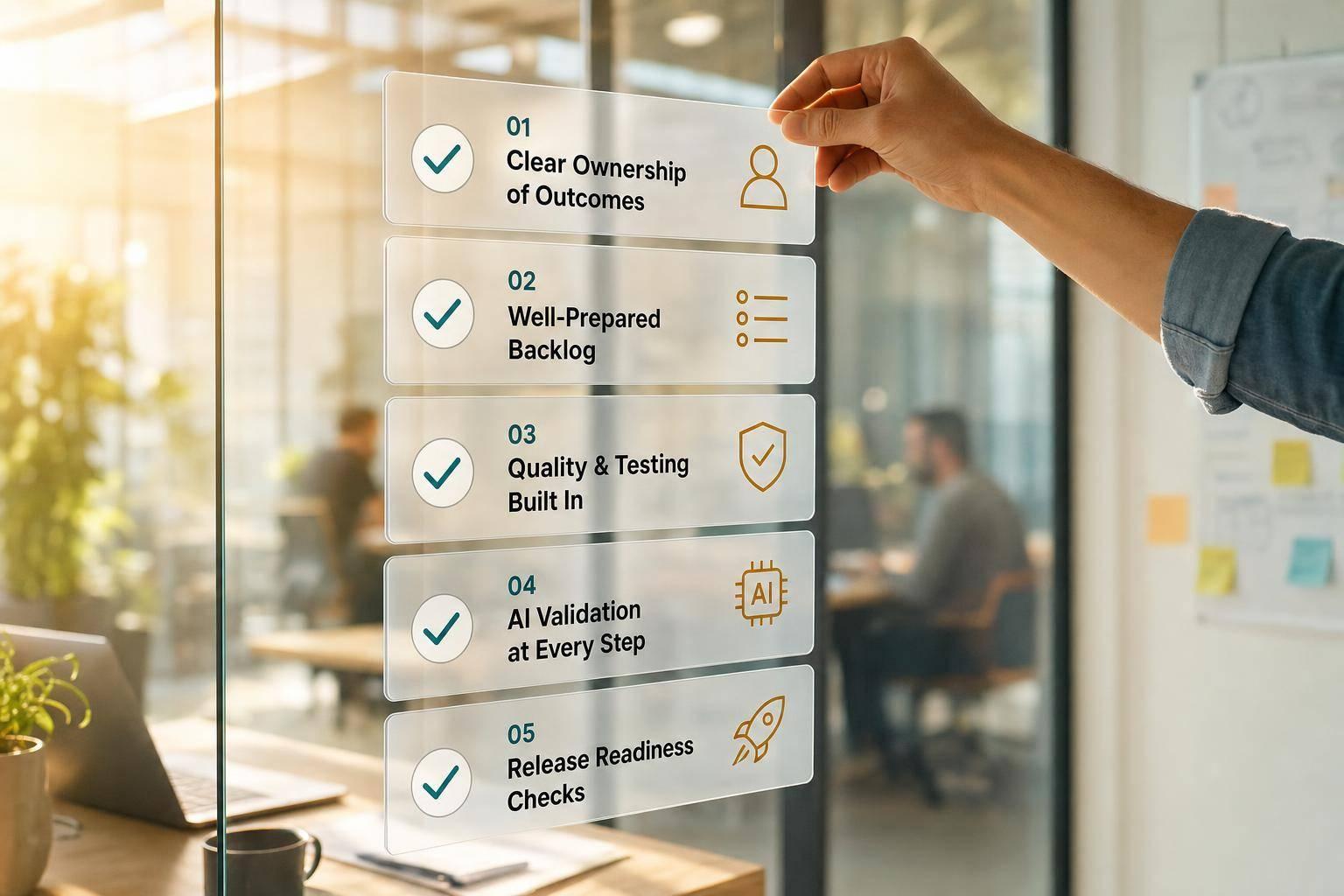
Checklist for Overcoming Agile App Development Issues
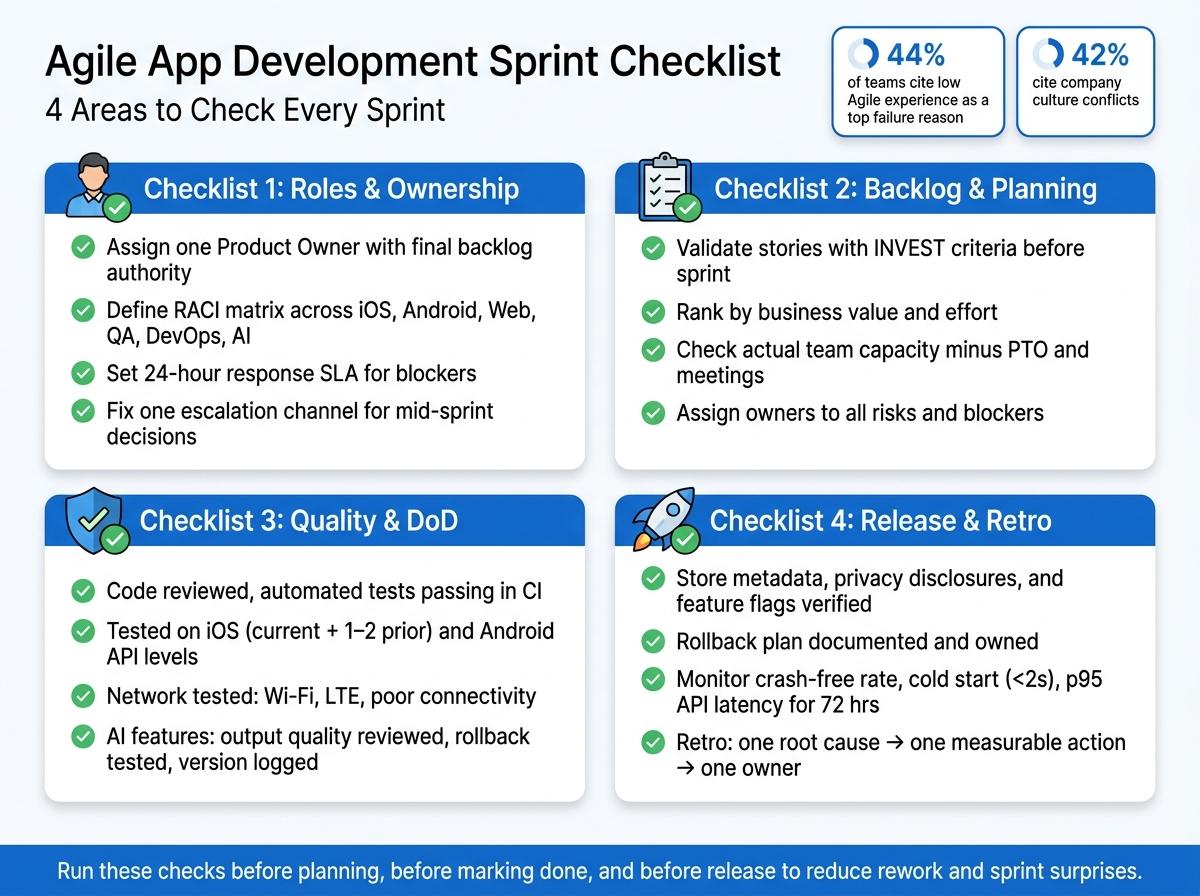
Most Agile app delays come from the same 5 problems: fuzzy ownership, weak backlog prep, thin testing, messy releases, and poor AI checks. In the source article, 44% of teams point to low Agile experience and 42% point to company culture conflicts as top failure reasons.
If I want fewer sprint surprises, I need to check a few things every sprint:
- Who owns each decision
- Which stories are ready
- What “done” means
- What must be tested before release
- How AI outputs, data, and rollback are checked
- What gets watched after launch
This article boils that down into a simple sprint habit. The main idea is easy: use short checklists before planning, before marking work done, and before release. That helps me cut rework, spot blockers early, and make delivery more predictable across iOS, Android, web, and AI features.
A fast way to look at it:
| Area | What to check | What it helps prevent |
|---|---|---|
| Roles | PO ownership, approvals, escalation path | Scope churn |
| Backlog | Acceptance criteria, dependencies, capacity | Bad sprint commitments |
| Quality | DoD, device coverage, network checks | “Done” work that is not shippable |
| AI | Test cases, data records, version logs, flags | Bad outputs in production |
| Release | Store metadata, privacy details, rollback, monitoring | Launch-day issues |
| Retro | One measurable action for next sprint | Repeating the same mistakes |
Bottom line: if I make these checks part of planning, review, and release work, I can keep Agile projects from stalling for the same avoidable reasons.
Agile Planning for Mobile Apps to build Faster Than Ever Before! BEGINNER SERIES
sbb-itb-622dc24
Checklist 1: Fix Roles, Ownership, and Communication Gaps
Start with ownership and communication. When decision rights are fuzzy, sprints drift, work gets redone, and delivery slows down. This checklist helps you lock in ownership before planning begins and cut down sprint churn.
| Issue | Checklist Items | Expected Impact |
|---|---|---|
| Decision owner | Assign one product owner, define approval path, document escalation rules | Faster scope decisions |
| Role boundaries | Map role ownership across product, design, engineering, QA, DevOps, and AI work | Fewer duplicated efforts |
| Communication cadence | Set daily blocker reporting, sprint review attendance, and urgent decision channels | Less sprint drift |
Product Owner and Stakeholder Alignment
Assign one Product Owner with final backlog authority. Scrum research is clear: the Product Owner owns what gets built, while the team decides how to build it. Once those lines get blurred, confusion shows up fast.
Your alignment checklist should include a one-page product vision reviewed at least quarterly, sprint goals written in measurable terms, and a documented approval path that spells out who signs off on new features, scope changes, and acceptance criteria.
For example, a sprint goal should look like this: "Release MVP onboarding flow to 50 beta users by Oct. 15, 2026". That gives the team something concrete to aim at.
Set stakeholder response times in plain terms too. If a blocker needs a decision, define the window up front, such as within 24 business hours, adjusted for U.S. holidays and weekends.
Team Role Clarity Across iOS, Android, Web, QA, DevOps, and AI Work
Assign one owner to each workstream: iOS, Android, web, backend, QA, DevOps, and AI/ML. A RACI matrix - Responsible, Accountable, Consulted, Informed - helps make that ownership visible across the team.
This matters even more for specialist work. App Store and Google Play submissions, release automation, push notification setup, AI model tuning, and model monitoring each need one named owner. If nobody owns them, handoffs tend to break down right before release. That’s the kind of problem that feels small at first, then turns into a fire drill.
Capacity planning should also reflect U.S. time zones and federal holidays. If a key owner is out, critical decisions or deployments can stall. Plan for that before the sprint starts, not in the middle of one.
Communication Routines That Prevent Sprint Drift
Use a fixed daily standup. Hold a 15-minute standup at the same time every business day and assign blockers live. Log blockers in a shared board and assign an owner during the call.
For distributed teams, set a fixed overlap window in Eastern Time. If someone can’t attend live, allow async updates so the team still has what it needs.
Design handoff and sprint reviews need the same kind of discipline. Designers should hand over annotated specs and edge-case states before development starts, not halfway through the sprint. Sprint reviews should include demos on real devices, with stakeholders either joining live or sending feedback within a fixed follow-up window.
Mid-sprint blockers need one clear path. That could be a specific Slack channel, an SMS line, or scheduled office hours. Pick one channel, name the person who monitors it, and define the response window. If an urgent call changes scope or acceptance criteria, log that decision in your project management tool right away so everyone can see what changed and why.
Once roles and communication are stable, move to backlog quality and sprint planning.
Checklist 2: Strengthen Backlog Quality, Sprint Planning, and Risk Control
Execution starts to slip when stories are fuzzy, dependencies are still hanging out there, or priorities haven’t been sorted by business value. Backlogs also go off track when low-value work crowds out the items that should come first. The fix is simple in theory: run these checks before the sprint starts, not after the team has already committed. Once ownership is clear, weak backlog quality is usually the next place things fall apart.
| Symptoms | Checklist Items to Apply | Expected Outcome |
|---|---|---|
| Vague user stories | Add acceptance criteria, dependencies, and business value ranking | Better sprint readiness |
| Overcommitted sprint | Review team capacity, carry-over work, testing effort, and deadlines | More reliable delivery |
| Hidden blockers | Track risks, assign owners, confirm access and approvals early | Fewer late surprises |
Backlog Readiness Before Sprint Planning
A story isn’t ready just because it exists in the backlog. Before anything goes into sprint planning, it should pass a short readiness check. The INVEST criteria - Independent, Negotiable, Valuable, Estimable, Small, Testable - give teams a simple way to judge that. Go story by story. If an item fails on any part of INVEST, it stays out of the sprint until it’s fixed.
This matters even more for notifications, payments, and AI features. For those items, the team should define triggers, dependencies, analytics, fallback behavior, and test coverage before the story enters the sprint.
Then rank ready stories by business value and effort before sprint planning begins. That one step makes planning faster and cuts down on carryover.
Sprint Scope and Capacity Checks
Overcommitment is one of the oldest traps in delivery. It leaves work unfinished and pushes defects into later sprints.
Before sprint scope is locked, check actual team availability - not the nice-looking version on paper. Re-estimate carry-over items based on where they stand now. Then subtract support work, meetings, and PTO before adding new feature work. If a story has rolled into a third sprint, treat that as a warning sign and run a root-cause analysis before it goes back on the board again.
Testing effort gets shortchanged all the time. In mobile apps, that means planning for device permutations across popular U.S. iOS and Android devices, network conditions like Wi-Fi, LTE, and poor connectivity, and regression coverage for key flows such as login and USD payments. Contractor timelines need the same level of review. If the sprint depends on specialized AI work or outside integrations, make sure those schedules line up before the team commits.
Deadlines tied to a U.S. business event need extra care too. If a release is linked to a holiday sale or campaign launch, work backward from that date and cap scope at what can be delivered and tested with confidence.
After scope is set, the next step is definition of done, testing, and release readiness.
Risk and Blocker Tracking Each Sprint
Most late surprises aren’t surprises at all. They’re risks the team could see early but never wrote down. Track each risk with an owner, impact, mitigation, status, and due date. Keep a separate section for active blockers. Review the risk board every sprint.
Before work starts each sprint, the team should confirm a few basics:
- Device access for testing
- Sandbox credentials and API access for outside services such as payment gateways, analytics tools, and notification providers
- Required approvals, including security reviews, data privacy sign-offs, and legal clearances, either completed or scheduled for a firm date
For AI features, the checks go a bit further. Confirm data access rights, privacy compliance, and that model performance thresholds are defined and measurable. These are not one-and-done checks. Put them on the sprint-start agenda every time, and assign a named owner to each open risk so nothing just sits there unresolved.
Once backlog, scope, and risks are stable, tighten Definition of Done and release checks.
Checklist 3: Improve Definition of Done, Testing, and Release Quality
Once the backlog, scope, and risks are under control, quality usually becomes the next place things slip. A team says a story is done, but the work still isn’t ready to ship.
That’s where the split matters. Acceptance criteria show that the feature works. Definition of Done shows that it’s tested, safe, documented, and ready for release. Start with one shared DoD for the team. Then add checks for each platform and, if needed, AI work.
Definition of Done for Mobile and Web App Features
Before any story is marked done, it should clear a small set of non-negotiable checks: acceptance criteria demonstrated, peer code review finished, automated tests added or updated and passing in CI, no critical or blocker defects open, staging deployment verified end to end, and release notes drafted or updated.
For mobile, the bar should be a bit higher. The DoD should also require testing on supported OS versions, such as the current iOS version plus one or two prior major versions and the Android API levels your app supports. It should also confirm that crash and performance monitoring SDKs are active, and that the team has done a basic performance pass on real devices, including cold start time, scroll smoothness, and behavior under normal network conditions.
AI features don’t replace the usual DoD. They add another layer on top of it.
| Checklist Category | Standard App Feature DoD | AI-Powered Feature DoD |
|---|---|---|
| Functional completion | Acceptance criteria met, code reviewed, tests passing | Acceptance criteria met plus prompt/model behavior verified |
| Quality checks | No critical defects, staging deployed, release notes updated | No critical defects plus output quality and safety reviewed |
| Release readiness | Supported OS versions tested, monitoring enabled | Monitoring enabled, rollback path ready, model or prompt version logged |
Putting this checklist right into your Jira ticket template or pull request checklist cuts down on debate when the sprint gets tight.
Once the DoD is set, the next step is simple: test the feature where people will actually use it.
Device, Network, and Usability Coverage
Testing on one developer phone is how bugs sneak into production. For iOS, cover at least one smaller screen, like an iPhone SE, and one current larger device, like a recent Pro Max. For Android, test across popular makers such as Samsung and Google Pixel, using both your minimum and target SDK versions. On the web, verify features in the latest Chrome, Safari, Edge, and Firefox, at common desktop resolutions and at least one mobile viewport.
Network coverage matters just as much. Core flows should be checked on stable Wi-Fi, normal 5G/LTE with added latency, and weak or spotty connections. You want to see clear loading states, retries that make sense, and error messages people can act on. Most of all, no user action should end in silent data loss.
For apps aimed at U.S. users, localization belongs in the DoD too. Make sure currency appears as $1,234.56, dates use MM/DD/YYYY, distances show in miles, and temperatures appear in °F wherever those values show up in the product. Accessibility basics should also be checked before a story closes, including keyboard navigation on web, VoiceOver on iOS, TalkBack on Android, color contrast, and support for dynamic text sizes.
AI Feature Validation and Data Quality Checks
AI features need the same discipline as any other feature, plus checks for data, outputs, and rollback. Before release, the team should run the model or prompt against a test dataset with normal inputs and edge cases, including ambiguous queries, incomplete data, and adversarial prompts. For each case, the team should define what acceptable output looks like. Human reviewers should also do structured spot checks, especially in sensitive areas like health, finance, or career guidance.
Data docs and version control aren’t optional here. Keep records for training and evaluation data that show sources, labeling methods, and known limits. Store prompt and model settings in version control with clear IDs, and log the active version at runtime so production issues can be tied back to the exact setup in use. If the feature uses personal data, a privacy review needs to happen before release.
Rollback should also be tested in staging before launch. AI features should ship behind feature flags that can be turned off fast, or they should support a return to an earlier model or prompt version without needing a full app store release. And before shipping, AI-specific monitoring should already be live, including user feedback flags, output error rates, and conversation drop-off.
After these quality gates are in place, the next step is release readiness and post-launch monitoring.
Checklist 4: Stabilize Releases and Build Continuous Improvement
Even teams with a solid backlog and strong quality gates can trip right before launch. That’s where a tight checklist helps. It keeps the team focused on release readiness, post-launch monitoring, and one follow-through item from the retro. Once quality gates are set, the last mile is all about launch control, live monitoring, and one measurable action for the next sprint.
| Common Release Problem | Checklist Applied | Observed Improvement |
|---|---|---|
| Last-minute launch issues | Verify store assets, privacy details, feature flags, rollback plan, and sign-off | Fewer launch-day failures |
| Weak post-launch visibility | Track crashes, latency, conversion, retention, and revenue | Faster issue response |
| Repeated team mistakes | Review retro actions, assign one owner, measure next-sprint improvement | Better continuous improvement |
Release Readiness Before Launch
Before any build goes live, confirm that App Store and Google Play metadata is final. That includes the app name, description, screenshots for common U.S. devices, preview video, category, age rating, and price tier in USD. Check that privacy disclosures in App Store Connect and Google Play Console match what the app actually does, especially if it touches location, health, or financial data. Permission prompts should tell people, in plain English, why access is needed.
New or risky features should sit behind feature flags with documented production defaults. The rollback path also needs to be written down and clearly owned. On top of that, make sure crash reporting and performance alerts are already routed to the on-call Slack channel or email before the build ships. Then get explicit sign-off from the product owner, QA lead, and engineering lead, even if that sign-off is just a Slack thread or a JIRA status change.
After launch, move straight into the first 72-hour monitoring window.
Post-Release Monitoring and Business Metrics
The first 72 hours after release carry the most risk. Track crash-free users and sessions by platform. Watch cold start time against a target of under 2 seconds for 95% of sessions, and track p95 API latency for key endpoints like login, search, and checkout.
Don’t stop at app health. Watch business metrics too:
- Onboarding completion rate
- Trial-to-paid conversion
- Day-1 and Day-7 retention for new users
- Daily revenue in USD, split by in-app purchases and subscriptions
For U.S.-focused apps, break these numbers out by region or time zone. That way, support coverage and campaign timing line up with how people are actually using the app.
Use what you learn here to pick the next sprint’s single improvement action.
Retrospectives That Lead to One Measurable Improvement Action
Start each retrospective by checking the previous sprint’s action items. What got done? What changed because of it? What’s still open? If something plainly didn’t help, cut it.
Then look at the sprint’s biggest problem and find one root cause behind it. Maybe it was scope creep. Maybe acceptance criteria were muddy. Maybe the release process was chaotic. Use 5 Whys to narrow it down to one root cause.
From there, turn that root cause into a small test for the next sprint. For example, require a finished release checklist with sign-off before any build is submitted. That can cut down the odds of last-minute store rejections. Assign one owner, put the action into the actual sprint backlog so it has to compete with delivery work, and define how success will be measured. Then check whether the next sprint improved the problem.
FAQs
How often should we use these checklists?
Use the full checklist at the start of each sprint - usually every one to four weeks, depending on the size of the project. Then revisit the key items during daily standups so you can spot blockers early, before they slow the team down.
Go back to the checklist again during retrospectives after each sprint to fix what isn’t working. For process or tooling items, monthly reviews are a good place to start. Once things settle down, you can shift those reviews to a quarterly cadence.
What should be in our Definition of Done?
A strong Definition of Done means the mobile or AI-powered app is actually ready at the end of the sprint, not just “mostly finished.”
It should cover a few clear checks:
- Features work as specified and pass QA testing
- AI models meet defined accuracy benchmarks and pass A/B testing
- Security tests are passed
- Key architectural decisions are documented
How do we validate AI features before release?
Validate AI features before release with human oversight, solid testing, and steady feedback loops. One smart move is to write tests before code generation. That sets clear expectations up front and helps cut down on hallucinations.
Use integration tests in a staging environment to see how the feature behaves in context, not just in isolation. Add sprint checkpoints for model validation so teams can catch issues early instead of scrambling at the end.
Before deployment, audit all AI-generated code and documentation for accuracy, security, and fit with user needs. If the output looks fine on the surface but fails under scrutiny, that’s a red flag. A careful review helps make sure the feature does what people expect - and doesn’t introduce problems you didn’t see coming.
More from the studio

