
All blogs
Mobile App Development
How to Manage Remote App Development Teams
Clear roles, one documented workflow, strict tools, time-zone SLAs, and automated quality gates prevent remote app teams from failing.
11 min read

How to Manage Remote App Development Teams
Remote app teams don’t fail because people work from home. They fail because ownership is unclear, handoffs are messy, and decisions get lost.
If I had to boil this down to the basics, I’d say this: set roles before work starts, use one documented workflow, keep tool use clear, set response rules across time zones, and block weak code before release. That’s the system.
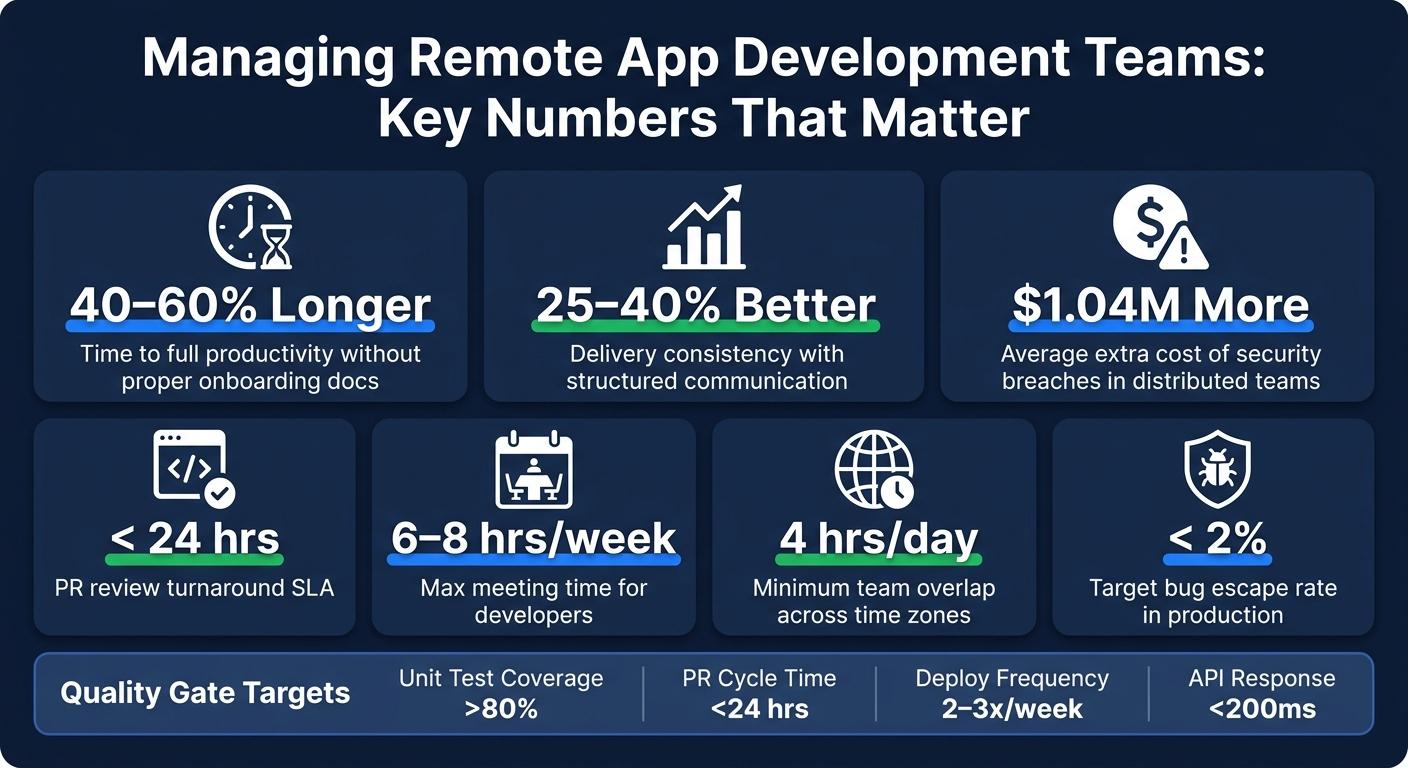
A few numbers from the article make the point fast:
- Remote developers can take 40%–60% longer to get up to speed when onboarding and workflow docs are weak
- Teams with structured communication see 25%–40% better delivery consistency
- A PR should be reviewed within 24 hours
- Developers should spend no more than 6–8 hours per week in meetings
- Distributed security breaches cost about $1.04 million more on average
If you’re running a remote app team, I’d focus on five things:
- Clear ownership: one owner per feature, decision, review, and release check
- Simple team setup: choose squads or staff support based on product scope
- Clear tools: chat for chat, task tracking for work, GitHub for code, CI/CD for checks
- Time-zone rules: response SLAs, written updates, and at least 4 hours of overlap
- Quality gates: test coverage, code review SLAs, static checks, and QA sign-off before release
Here’s the article in one simple view:
| Area | What I’d put in place |
|---|---|
| Team structure | Product, mobile, backend, QA, design, DevOps, with clear owners |
| Workflow | Shared specs, working rules, README, acceptance criteria |
| Tools | Slack/Teams, Zoom/Meet, Loom, Linear/Jira, GitHub |
| Communication | Channel rules, response times, written standups, decision log |
| Delivery checks | Small tickets, short branches, CI/CD checks, QA sign-off |
| Metrics | PR cycle time, deploy frequency, sprint variance, bug escape rate |
If the system is clear before the first sprint, the team has a much better shot at shipping on time and with fewer blockers.
5 Remote Management Tech Tools I Can't Live Without
sbb-itb-622dc24
Step 1: Define Team Structure, Ownership, and Working Rules Before Development Starts
Set roles, ownership, and working rules before sprint work starts. That upfront setup helps you avoid messy handoffs once people are deep in the work.
Define Roles and Who Owns Each Decision
Every remote app team needs a core set of roles in place before development begins. That usually means a product owner/manager, mobile developers for iOS and/or Android, backend or AI engineers, a UI/UX designer, a QA engineer, and DevOps or release support. Your headcount may change based on scope, but the responsibilities still need to land somewhere. They can't just float around.
The product manager defines the problem, the user experience, and the business goals. The team handles implementation. For each feature, assign one clear owner for scope, review, testing, and release readiness.
Before Day 1, do a quick role inventory. Write down each technical responsibility, group it by domain, and mark anything without an owner. A simple breakdown works well:
- Frontend
- Backend
- DevOps
- QA
- Architecture
Those unowned areas are usually where delays, dropped tasks, and awkward handoffs show up later.
Pick a Team Model That Fits Your Product Scope
A simple way to shape a remote app team is to choose from feature-based squads, cross-functional squads, or staff augmentation.
| Situation | Recommended Model |
|---|---|
| Scaling a live product with multiple features | Feature-based squads |
| Needing end-to-end ownership across planning, design, coding, testing, and QA | Cross-functional squads |
| Closing a specific skill gap, like AI or DevOps | Staff augmentation |
This choice matters more than it may seem at first. A team model affects how work moves, who makes calls, and where bottlenecks show up.
Write Down the Core Workflow in One Shared Place
Once roles are set, document the workflow in one shared place. Use a single workspace for team docs, such as Notion or Confluence.
Before sprint work begins, create a product specifications document that covers the project objectives, technology stack, architecture, user flows, user stories, and clear acceptance criteria. Then add a one-page working agreement with core working hours, expected response times by channel, decision-making protocols, escalation paths, and code review turnaround time.
Set a code review rule so every pull request gets reviewed by at least one other developer within 24 hours.
Your codebase README should also be ready before the first developer starts. Include:
- Step-by-step local environment setup
- Key dependencies
- Test execution instructions
- Staging deployment steps
This becomes the team's go-to reference for sprint planning, reviews, and release readiness. Without this kind of structure, remote developers can take 40–60% longer to reach full productivity.
That shared workflow sets the baseline for communication, code review, and release decisions.
Step 2: Build the Right Tool Stack for Communication, Delivery, and Security
Once roles and workflow are set, choose the tools that keep communication clear, delivery steady, and access under control. A good stack cuts down on missed messages, failed builds, and avoidable access issues. The workflow shouldn’t live in a doc and then get ignored. Your tools should make it visible, back it up, and keep it safe.
Use Separate Tools for Chat, Meetings, and Task Tracking
Don’t cram chat, meetings, and task tracking into one place. Use Slack or Teams for chat, Zoom or Meet for live calls, Loom for async updates, and Linear or Jira for task tracking.
Use U.S. date and time formats across the board: MM/DD/YYYY and time-zone labels like 10:00 a.m. PT for every deadline and meeting invite.
That split matters. It keeps chat from swallowing key decisions, and it keeps delivery work inside tools built to track it.
Standardize Git, Code Review, and CI/CD Pipelines
Use GitHub for version control, pull requests, and CI/CD. Stick with trunk-based development, and keep feature branches under three days to keep merge conflicts manageable and context switching low.
Set clear pull request rules:
- Every PR needs at least one reviewer
- Branch names follow one shared convention
- Automated checks like linting and unit tests must pass before a merge
For app projects, automate builds and tests so every merge is checked before code moves ahead.
Once delivery is set, tighten access before the team gets bigger.
Lock Down Remote Access From Day One
Set security rules before the first commit. Require MFA, VPN access, managed devices, and full-disk encryption from day one. Use a secret management tool like 1Password or AWS Secrets Manager so credentials stay out of the codebase.
Apply role-based permissions and the principle of least privilege across code repositories, cloud infrastructure, and design files. Give each person access only to the systems they need. For health apps or any product that handles PII, use stricter controls for HIPAA and CCPA/CPRA obligations.
Security breaches in distributed environments cost an average of $1.04 million more than breaches in on-premises settings, mostly because detection takes longer. That’s a strong case for getting access controls in place before the first line of code is written.
Step 3: Set Up Clear Communication Routines Across Time Zones
Once your tools are set, the next job is simple: make sure everyone uses them the same way. You want fewer messages, less back-and-forth, and better timing.
Set Channel Rules and Response Time Expectations
Tools alone don't fix communication. The team needs clear rules for where to post, what belongs in each channel, and how fast people should reply. That keeps blockers from slowing builds, reviews, and releases.
| Channel | Purpose | Response SLA |
|---|---|---|
| Slack #dev-urgent | Production issues, critical blockers | 15 minutes |
| Slack #dev-team | Quick questions, non-urgent blockers | 2–4 hours |
| GitHub / Linear | Code reviews, spec clarifications | 24 hours |
| Contract changes, formal escalations | 24 hours | |
| Loom | Feature walkthroughs, complex explanations | 4 hours to record |
Make each person's UTC working hours easy to find so overlap is clear at a glance. Aim for at least 4 hours of shared time each day, then lean on async communication outside that window.
Also, log every decision in Notion, GitHub, or a decision log before it's final. If a choice only lives in Slack, it tends to disappear when someone needs it most.
Once those response rules are locked in, set a meeting rhythm that keeps work moving without dragging people into constant live calls.
Run Daily and Weekly Routines That Keep Work Moving
Keep meetings tight. Developers should spend no more than 6–8 hours per week in meetings, including standups.
A written daily update often works better than a live standup. It should include:
- current focus in 1–2 sentences
- status: 🟢 On track / 🟡 Minor blocker / 🔴 Blocked
- a clear blocker note, if there is one
- availability in UTC
This gives the team what it needs without stopping everyone's day. More importantly, it helps surface blockers before they slow a merge or push back a release.
For the weekly rhythm, protect your overlap window for sprint planning and backlog refinement. At the end of every sprint, share a demo of working software, either live or recorded. And for any live meeting, require a written agenda at least 24 hours ahead of time. No agenda, no meeting.
After that rhythm is in place, the next step is checking whether it's leading to shipped work.
Measure Outcomes, Not Online Hours
Hours online and message volume can look busy, but they don't prove progress. What matters is whether work is moving forward and whether quality stays steady.
"Well-tested code matters more than lines written or hours logged."
Teams that use structured communication frameworks see 25–40% higher delivery consistency than teams working in a more ad-hoc way. That kind of lift shows up in shipped code, not chat activity.
Track a small set of delivery signals:
- sprint velocity with a target variance of ±15%
- PR cycle time under 24 hours
- deploy frequency of 2–3 times per week
- bug escape rate under 2%
These metrics help spot bottlenecks early, before delays pile up or quality slips.
Those same signals can also show when quality checks or release controls need a tighter grip.
Step 4: Control Quality, Releases, and Common Remote Team Problems
If you want the Step 3 metrics to stay in good shape, quality has to be part of the workflow from the start. Not something you bolt on right before release.
Break Work Into Small, Testable Pieces
Start by making each work item small enough to review, test, and ship without drama.
Each ticket should include a clear description, acceptance criteria, and a Definition of Done before anyone starts work. On day one of each two-week sprint, break backlog items into smaller tasks so they fit inside the sprint window.
Short-lived branches help too. They cut down on merge conflicts and make reviews easier to handle.
Set Quality Gates for Code, Testing, and Releases
These gates help stop the Step 3 metrics from drifting in the wrong direction.
Quality should be enforced by the pipeline, not left to manual checks. Add automated testing, static analysis, and linting straight into your CI/CD flow so failing code gets blocked before merge.
| Quality Gate | Standard | Ownership |
|---|---|---|
| Unit Test Coverage | >80% of new code | Lead Dev / Agency |
| Code Review SLA | Feedback within 24 hours | Tech Lead / Senior Dev |
| Static Analysis | Zero high-severity errors | CI/CD Automation |
| API Response Time | Response time <200 ms | Technical Lead |
| Bug Escape Rate | <2% production bugs | QA + Agency |
For iOS, Android, and web releases, require a manual QA sign-off for core user flows in a staging environment before moving to production.
Fix the Most Common Remote Team Problems Early
When these gates fail, the same issues tend to pop up: slow reviews, fuzzy ownership, and messy handoffs.
A PR sitting for more than 48 hours is a warning sign. In practice, any PR older than 24 business hours should be treated as blocked.
Unclear accountability is cited as the cause of 40% of distributed team failures. So after each meeting, write down the owner and the due date.
If your team has little overlap, written handoffs and Loom walkthroughs make cross-time-zone work much smoother.
Also, keep decisions and blockers in writing so people can find them later without digging through chat threads.
Conclusion: A Simple Management System for Remote App Teams
Managing a remote app team starts with the system you put in place before anyone writes code.
The approach is simple: define ownership, document the workflow, standardize tools, set communication rules, and automate quality checks.
That setup matters because it keeps remote teams aligned and makes delivery more predictable.
The answer is upfront discipline: write the rules, standardize the tools, and enforce quality from day one - and your remote app team will ship faster with fewer blockers.
FAQs
How big should a remote app team be?
It depends on the team’s stage of growth and how much management bandwidth is available.
In general, teams with 5–20 members are usually easier to run with a flat structure and direct communication. People can talk to each other fast, make decisions without much red tape, and stay aligned without too much formality.
Once teams grow to 20–50 members and beyond, things often change. At that point, teams usually need more structure, clearer documentation, and extra management layers to keep coordination and productivity on track.
What should I document before the first sprint?
Before the first sprint, write down the basics so the team can get moving without guesswork:
- Team roles and ownership
- The communication model, including standups, blockers, reviews, and sprint ceremonies
- A README or onboarding docs for setup, testing, and deployment
- Tool access, workflows, expectations, and team culture
This gives everyone a clear starting point. It also makes onboarding easier and helps the team line up early around how work gets done.
How do I manage a team across multiple time zones?
Set a defined overlap window of 2 to 4 hours each day for live decisions, meetings, and team work. Protect that time for the tasks that need fast back-and-forth.
Outside that window, lean on async communication, clear documentation, and written handoffs. Use tools like Slack, Jira, or Confluence to track decisions and blockers, and avoid making critical decisions outside the shared window.
More from the studio

