
All blogs
AI App Development
Healthcare AI Prompts: 7 Data Minimization Checks
Seven checks to ensure only necessary patient data reaches AI: fields, identifiers, notes, history, retrievals, tool outputs, and traces.
9 min read

Healthcare AI Prompts: 7 Data Minimization Checks
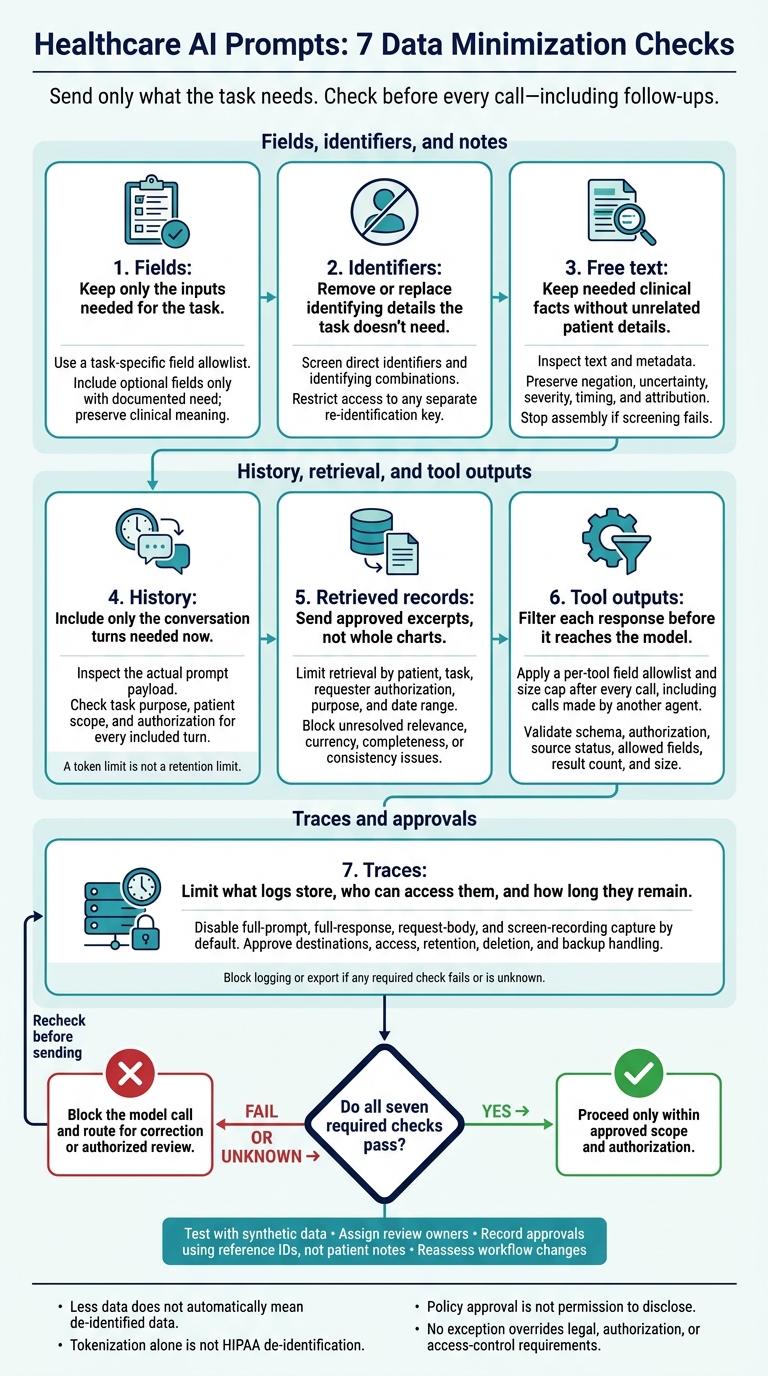
Before I send patient data to an AI model, I check seven places where extra information can slip in. My rule: send only what the task needs, and block the call if a required check fails or remains unknown.
Here’s what I review before every call - including follow-ups:
- Fields: Keep only the inputs needed for the task.
- Identifiers: Remove or replace identifying details the task doesn’t need.
- Free text: Keep needed clinical facts without unrelated patient details.
- History: Include only the conversation turns needed now.
- Retrieved records: Send approved excerpts, not whole charts.
- Tool outputs: Filter each response before it reaches the model.
- Traces: Limit what logs store, who can access them, and how long they remain.
I test these controls with synthetic data, assign review owners, and record approvals without copying patient notes. <u>Less data does not automatically mean de-identified data</u>, and policy approval is not permission to disclose. Any exception still has to meet legal, authorization, and access-control requirements.
Checks 1–3: Limit Fields, Identifiers, and Notes
Define the task, expected output, and decision boundary before assembling the prompt. Inventory the inputs, send uncertain cases to the data steward or clinical owner, and test controls with synthetic records.
Start with the field allowlist.
1. Keep Only Fields Needed for the Task
Tie the field allowlist to the approved task. Leave out optional fields unless the owner documents why they’re needed. Reduce detail only when clinical meaning stays intact. An age range, for instance, cannot replace exact age when exact age affects dosing.
Only fields that change the output belong in the prompt.
For a hypothetical pharmacist medication-reconciliation draft:
Classification Fields Reason and handling Required Current medication name, strength, route, frequency; allergy and intolerance details Keep because they directly support reconciliation and safety review. Optional Approximate age range, relevant kidney-function category, recent medication-change date Include only when documented as output-critical. Prohibited for this task Name, medical-record number, address, phone number, insurance details, unrelated diagnoses, full chart, family information Block because they do not serve the stated task.
2. Remove or Replace Unneeded Identifiers
Screen for direct identifiers and combinations that could identify someone: names, contact details, record numbers, dates, small locations, rare occupations, and unusual events. A blank name field is not enough. Remove identifiers unless they change the task result.
HIPAA Safe Harbor removes 18 identifier categories, usually keeping dates at the year level and grouping ages over 89 as:
“90 or older.”
Those are requirements of that de-identification method. They do not prove that a prompt with fewer fields is de-identified.
When continuity matters, use consistent tokens with no identifying meaning. Restrict access to the separate re-identification key. Reduce date or location precision only when the task permits it.
Block identifying values unless their purpose and authorization are documented. Require an explanation of why a less precise substitute won’t work. Tokenization alone is not HIPAA de-identification, and it does not replace access controls.
3. Keep Only Needed Facts From Free-Text Notes
Apply the same rules to free text as to structured fields. Inspect every text source and its metadata - not just database columns. HHS applies de-identification requirements equally to structured fields and free text.
Extract only facts needed for the task. Preserve negation, uncertainty, severity, timing, and attribution. Use deterministic pattern checks alongside contextual screening, with authorized human review for ambiguous or high-risk content.
If screening fails, stop assembly rather than send the full note. Return a specific reason and route the issue for correction or review. Test synthetic cases that should pass, fail, or fall near the boundary to verify that controls block prohibited data without losing needed clinical meaning.
sbb-itb-622dc24
Checks 4–6: Limit History, Retrieval, and Tool Outputs
4. Include Only History Needed for the Current Task
After filtering individual fields, limit the older context sent to the model. Conversation history can bring unnecessary PHI into the prompt.
Inspect the actual prompt payload, not just the latest message. Every included turn needs a documented task purpose, patient scope, and authorization. Set separate limits for prompt context and retention. A token limit is not a retention limit.
| History option | Privacy exposure | Task usefulness | Recommended use |
|---|---|---|---|
| Full history | Highest: may include unrelated PHI, identifiers, and stale instructions | Sometimes high, but difficult to audit | Avoid by default; allow only with documented justification |
| Task-scoped history | Lower: includes only approved, relevant turns | Usually sufficient for focused tasks | Use by default after relevance and authorization checks |
| No history | Lowest for conversation leakage | May reduce continuity and require more clarification | Use for independent tasks, high-risk workflows, or failed context validation |
Keep preference memory separate from patient records. Treat preferences that reveal health information as sensitive, and apply approved purpose, access, and retention rules to stored patient history.
Give authorized reviewers a limited view of the selected turns and the reasons for including them - not unrestricted access to conversations. HHS says organizations should define which roles need access, which PHI categories they need, and when access is allowed. Routine requests can follow standardized protocols.
5. Retrieve Only Approved, Relevant Record Excerpts
Limit retrieval by patient, task, requester authorization, purpose, and date range. Add department, encounter, or document-type boundaries when needed. Return only the excerpts needed to complete the task and interpret the information.
HHS guidance says organizations should define the PHI categories and access conditions appropriate for each type of access. They should not assume that a particular purpose requires an entire medical record.
Show reviewers the requester or service, purpose, patient scope, authorization decision, source documents, dates, selected excerpts, relevance reason, and access timestamp. Let them approve, reject, or narrow the result without exposing unrelated records.
Test patient, department, and episode boundaries with synthetic or deidentified records. Block results with unresolved relevance, currency, completeness, or consistency issues. Update stale sources, retrieve missing context within narrow limits, or send conflicts for review. Any search beyond approved boundaries requires a new authorization decision.
6. Filter Tool Outputs Before Every Model Call
Retrieved excerpts need a final filter before entering the prompt. Even outputs from approved systems must be reduced to what the model needs.
Apply a per-tool field allowlist and size cap after every call, including calls made by another agent. Remove credentials, access tokens, internal notes, and unrelated results.
Before forwarding an output, validate its schema and field types; authorization for the requester, patient, and purpose; source status; allowed fields; result count; and size.
Define how each result should be handled:
- Empty: Ask for clarification or return a no-data response.
- Conflicting: Block automatic synthesis.
- Stale: Require updated results or disclosure of their age.
- Truncated: Require pagination or treat the result as a failure.
- Overly broad: Narrow the results before another model call.
Tool access does not authorize forwarding the full response or expanding access without approval.
Check 7: Control Traces and Record Approvals
7. Limit Trace Content and Retention
After filtering what reaches the model, control what gets copied into logs, traces, and review systems. Map every place patient data is copied or stored: populated prompts, retrieved excerpts, tool requests and responses, model outputs, debugging tools, and review queues.
Disable full-prompt, full-response, request-body, and screen-recording capture by default. Remove unnecessary values before capture. Use prompt versions, field allowlists, counts, approval IDs, and hashes or fingerprints instead of clinical content where possible. HIPAA’s audit-controls standard requires mechanisms to record and examine activity in systems containing or using ePHI.
Approve each destination’s role-based access, encryption, retention period, deletion method, and backup handling. Audit access to the trace store itself. HIPAA’s six-year documentation rule does not require six years of raw trace storage.
Before enabling logging or trace export, check the approved logging settings, destination, access scope, user authorization, policy version, exception status, and model or vendor approval. Block logging or export if any check fails or returns an unknown result. After use, sample retained traces, verify deletion, investigate incidents, and reassess approvals when workflows change.
Use approvals to limit trace scope - not expand it.
Assign Review Owners and Record Decisions
Enforcing a policy is not the same as granting permission to disclose. Record the purpose, reason for trace approval, allowed fields, excluded data, retrieval scope, approved destination, prompt version, policy version, approver, timestamp, retention choice, and exceptions. Use reference IDs, not patient notes.
These controls follow organizational policy and HHS guidance; they do not create legal safe harbor. Automation can enforce an approved policy, but it cannot authorize a new disclosure.
| Decision path | When it applies | Accountable owners and evidence |
|---|---|---|
| Automated policy approval | Previously approved purpose, fields, destination, and retention | Prompt author and data steward; policy version, rule result, timestamp, approval ID |
| Data-steward review | New or expanded fields, retrieval scope, or retention | Prompt author and data steward; necessity, allowed scope, exception rationale |
| Privacy or security review | New destination, identifier handling, or access model | Authorized privacy or security reviewer; safeguards, risk assessment, contract or BAA status where applicable |
| Clinical-owner review | Patient-facing output or content that may affect care | Authorized clinical owner; intended use, human-review requirement, escalation path |
Validate trace controls with synthetic data before any live request.
Test Data Controls Before Release
Use synthetic fixtures to check that direct identifiers are removed or tokenized, sensitive free text is excluded, and one patient’s records cannot appear in another patient’s request. Verify that retrieved excerpts stay within the allowlist, tool outputs are filtered, and traces no longer retain prohibited values after the configured expiration.
Include test cases for prompt injection in a note, malformed tool output, a user without permission, failed redaction, a new model destination, and a logging-service outage. Run tests in a nonproduction environment, inspect logs and backups, record pass/fail evidence, and repeat the tests after changes.
Conclusion: Block Requests That Fail Required Checks
Block every model call until all seven checks pass: approved fields, identifiers, notes, history, excerpts, outputs, and trace settings. These checks are the last stop before unnecessary patient data reaches the model. If any check fails or its status is unknown, stop the call and send it for review. Trim the payload or use an approved substitute.
Document each exception, limit its scope and duration, and require authorized approval. No exception overrides legal, authorization, or access-control requirements.
Start with one recurring workflow, a field allowlist, and named owners across clinical, privacy, security, engineering, and business teams. Keep approval evidence current and date every review. Apply the checklist as a recurring gate - not a one-time review. Reassess changes to prompts, models, tools, retrieval sources, or logging. Prior approval does not cover expanded data paths.
FAQs
How do I minimize patient data without compromising clinical accuracy?
Collect only the patient information needed for your clinical goals. Redact sensitive identifiers from training datasets before they reach the model. Check timestamps and remove duplicate records to reduce data noise.
Use role-based access controls and progressive disclosure to limit exposure. Make sensitive raw data available only when needed. For critical decisions, have human reviewers check model outputs to preserve clinical context and judgment.
Where should review gates sit in a multi-agent workflow?
Place review gates where data passes between agents or stages, especially before sensitive information reaches a model and after the model produces output. These checkpoints keep unnecessary patient data out of models, enforce data minimization, and catch errors before they spread.
During development, human reviewers should check AI-generated outputs against business goals and compliance requirements. This helps maintain quality and security while agents handle high-volume processing.
How can I troubleshoot AI errors without logging patient data?
Keep debugging separate from live patient data. Remove identifying details and sensitive health information before adding data to training or testing datasets. Reproduce errors with synthetic datasets or anonymized input-output pairs.
Use unit tests with automated assertions to check core logic against structured, non-sensitive categories. Have reviewers check filtered outputs in a consistent way to spot failure patterns. Use only sanitized data to diagnose issues and refine your AI models.
More from the studio

