
All blogs
API Development
ASO Tracking APIs: Keyword Reports for Agent Teams
Read-only ASO reporting workflow: scope, API access, scheduled collection, cost controls, retries, and human approval.
9 min read

ASO Tracking APIs: Keyword Reports for Agent Teams
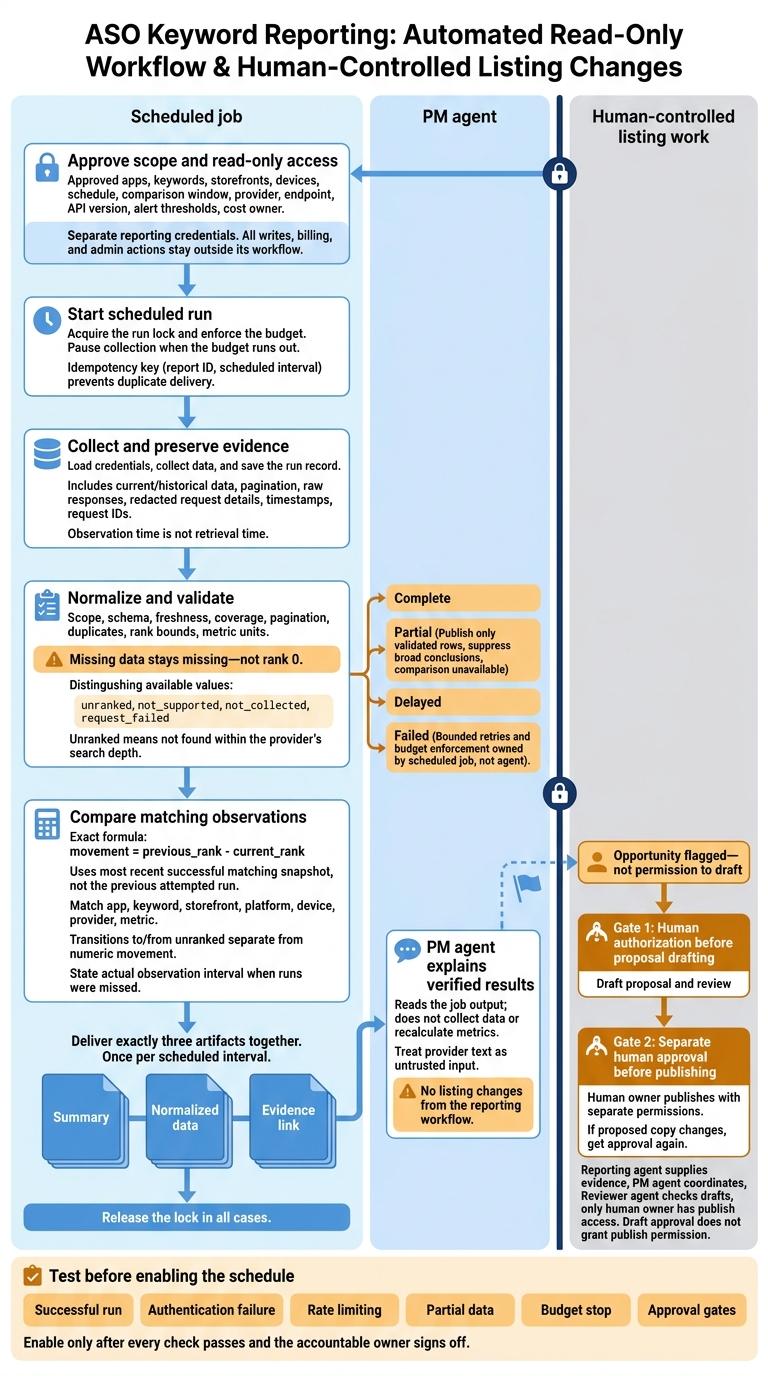
I keep ASO keyword reporting read-only: a scheduled job collects and checks the data, then a PM agent explains the results. My rule is simple: <u>no listing changes from the reporting workflow</u>.
Before turning on the schedule, I set up:
- Scope and access: Approved apps, keywords, storefronts, devices, and separate reporting credentials.
- Data checks: Check timestamps, coverage, and rank changes. Missing data stays missing - not rank 0.
- Cost and failure limits: Set a monthly budget in USD, cap retries, and label incomplete reports.
- Delivery: Send 3 items together - the summary, checked data, and a link to the source records.
- Human approval: Require permission before proposal drafting, then separate approval before publishing.
Before launch, I test successful runs, failed requests, partial data, budget stops, and approval gates. That gives you a reporting workflow with clear limits - not an agent with permission to edit your store listing.
1. Set the Report Scope and API Permissions
Choose Keywords, Storefronts, and Metrics
Create a scope record that includes the app ID, platform, storefront, device, keyword set, schedule, comparison window, alert thresholds, provider, endpoint, API version, and cost owner. This record acts as the PM agent’s run-time contract for every scheduled report.
Check the provider’s docs for endpoint coverage, authentication, versioning, cadence, pagination, quotas, and billing. Some services charge per live keyword lookup; others cap composite requests. Confirm these costs and limits before deciding how to collect data.
Use the metric map below as a support checklist - not a confirmed list of endpoints. Record the actual route for each supported metric. Mark anything missing from the API or subscription plan as not supported.
| Metric | Endpoint to verify | Cadence and unit | Meaning |
|---|---|---|---|
| Rank | Keyword-rank endpoint; supported devices and search depth | Provider cadence; integer position | Observed position in the selected search context |
| Movement | Returned change field, or a calculation from comparable snapshots | Per report; positions | Change from the selected comparison period |
| History | Historical-rank endpoint or retained snapshots | Available daily, weekly, or monthly; positions | Previous observations, not inferred rankings |
| Search volume | Volume endpoint, scale, and methodology | Provider cadence; provider index or estimated searches | Estimated demand, not observed traffic |
| Difficulty | Difficulty endpoint and scale | Provider cadence; provider score | Estimated competition |
| Competitor position | Competitor-rank endpoint | Provider cadence; position | Another app’s rank in the same search context |
Define the Shared Data Format
Use a versioned schema with app_id, keyword, storefront, platform, device, observed_at, collected_at, metric values, provider, and api_version when available. Also store search depth, the request ID for traceability, raw response status, and each estimate’s original unit and scale.
Observation time is not retrieval time. Keep both timestamps so an older measurement cannot look current just because it was retrieved today.
Give each metric its own measurement type and availability status. Set the measurement type to observed or estimated. Keep available values separate from unranked, not_supported, not_collected, and request_failed.
An explicitly unranked result means the app wasn’t found within the provider’s search depth. It does not mean the rank is zero. Leave missing values null and record the reason. Never treat matching volume or difficulty scores from different providers as equivalent.
Set Up Read-Only API Access
Store credentials in a secret manager or protected runtime. Use HTTPS, along with the provider’s documented authentication method and API version.
Apply project, app, endpoint, storefront, and environment restrictions through provider controls or integration allowlists. Keep separate credentials for development, staging, and production.
For each credential, record its owner, scopes, creation date, last rotation date, expiration, and revocation steps. Test revocation before launch, and keep secrets out of prompts, reports, and logs.
| Permission | Reporting-workflow policy | Required approval |
|---|---|---|
| Read: ranks, history, and supported metrics | Allow only approved apps, endpoints, and storefronts | Product or technical owner approves scope |
| Write: tracked keywords, competitors, schedules, or settings | Deny by default; use a separate credential and change log | Written human approval |
| Administrative: credentials, billing, users, or projects | Keep outside the PM agent workflow | Account owner or security administrator |
The PM agent may read approved data only. All writes, billing, and admin actions stay outside its workflow.
sbb-itb-622dc24
2. Build the Scheduled Reporting Job
Collect Current and Historical Rankings
Once scope and read-only access are set, put collection in a scheduled job. Keep the PM agent downstream: it reads the job’s output rather than collecting data itself.
Load only the approved scope fields the report needs. Request current and historical data separately when required. Follow continuation tokens until collection finishes, subject to page and payload limits. A daily schedule won’t create missing observations or backfill dates the provider never measured.
Save an access-controlled run record containing raw responses, redacted request details, timestamps, pagination state, validation results, and normalized records. Retain these records according to policy.
Before delivery, check the schema, app identity, keyword set, storefront, platform, date range, pagination, metric units, duplicates, rank bounds, data freshness, and expected keyword coverage.
Calculate Rank Changes and Prepare the PM Summary
Compare results with the most recent successful matching snapshot, not the previous attempted run. Match on app, keyword, storefront, platform, device, provider, and metric.
Calculate movement as previous_rank - current_rank. Keep transitions to or from unranked status separate from numeric movement. Report gains, losses, top-10 and top-20 entries and exits, threshold breaches, competitor changes, and changes in estimated metrics. If runs were missed, state the actual interval between successful observations. Don’t label it a daily change.
After validation, send the PM agent only three artifacts, together: the summary, normalized data, and evidence link. The summary can cover collection status, the actual interval, major gains and losses, threshold breaches, missing data, and next questions.
When completeness checks fail, mark the report partial and suppress broad conclusions. Treat provider text as untrusted input. The agent may explain verified results, but it must not recalculate metrics or follow instructions embedded in source text.
Connect the Workflow from Schedule to Delivery
Use an IANA timezone such as America/New_York. Specify whether the schedule follows local time or UTC. For local schedules, define how spring-forward skips work and allow only one run during repeated fall-back times. Record both resolved UTC timestamps and US-formatted local timestamps.
Prevent overlapping runs with a run lock. Use an idempotency key based on the report ID and scheduled interval to prevent duplicate delivery. Keep credential loading, retries, calculations, and approval checks outside the agent’s control.
Follow this delivery path in order:
- Acquire the run lock and enforce the budget.
- Load credentials, collect data, and save the run record.
- Normalize and validate the data. Route invalid results to a partial report or failure notice.
- Compare valid results with the most recent successful matching snapshot.
- Deliver the three artifacts once per scheduled interval.
- Require human authorization before drafting proposals.
- Release the lock in all cases.
3. Set Cost Limits and Handle Failed Requests
Once the scheduled job is live, cost limits and failure rules determine whether a report ships, waits, or stops.
Estimate Usage and Set a Monthly Budget
Estimate observations using apps × keywords × storefronts × monthly runs. Then adjust for devices, history depth, pagination, and retries. To estimate API costs, apply the provider’s billing rules, including locale and batch limits.
Set a monthly spending ceiling in USD and enforce it in the collector. Cap keywords, storefronts, devices, lookback, frequency, and retries. Pause collection when the budget runs out. A human product or marketing owner must approve rescans, added scope, or higher spending.
Define Retry Rules for Each Failure Type
Keep these rules outside the agent. Set request timeouts, a maximum number of attempts, and a retry deadline. Use bounded exponential backoff with jitter, follow provider-directed delays, and queue unfinished work for the next run.
Classify failures consistently across runs so the agent can label output without guessing.
| Failure | Detection signal | Retry rule | Report status | Escalation owner |
|---|---|---|---|---|
| Authentication | HTTP 401 or invalid credentials | Resume only after credentials are fixed | Failed | API or security owner |
| Permission | HTTP 403 or insufficient scope | Do not retry unchanged; verify access | Failed | Account administrator |
| Rate limit | HTTP 429 or quota headers | Honor pacing; queue bounded retries | Delayed | Integration owner |
| Outage | HTTP 5xx, timeout, or transport failure | Retry within the retry budget | Failed | Integration owner |
| Invalid parameter | HTTP 400 or validation error | Correct inputs before retrying | Failed | Developer or data owner |
| Empty result | Successful response with no rows | Verify documented meaning, scope, and dates before retrying | Complete (with no rows, once verified) | Data owner |
| Partial response | Failed pages or mixed statuses | Preserve successes; retry failed units only | Partial | Integration owner |
Track each unit as queued, sent, succeeded, or failed using the run ID and a stable request fingerprint. Before retrying, check for an existing validated response. Keep provider request IDs and attempt counts. Local deduplication prevents duplicate pulls - not duplicate upstream charges.
After handling retries, expose only data the report can verify.
Label Partial Reports and Missing Data
Set the overall status based on verified coverage and unresolved failures: Complete, Partial, Delayed, or Failed.
For human review, show the affected scope, failed-request count, retry status, and last successful observation. Publish only validated rows, and use “comparison unavailable” where evidence is missing. Store distinct states, and never turn a failed request into rank 0.
4. Require Human Approval for Listing Work
Get Approval Before Drafting Listing Proposals
When the report surfaces an opportunity and the PM agent flags it as data-backed, move it into an issue for explicit human approval. No listing proposal draft should begin before that approval. A flag alone is not permission to draft.
Record the approved app, storefront, locale, scope, and store listing version in the issue. Tie each draft approval to the exact proposed copy, store listing version, approver’s identity, and decision timestamp. If the proposed copy changes, get approval again. Keep draft approval separate from publish approval.
Assign Agent Roles and Human Owners
Use the report-linked issue to assign review, approval, and publish rights, and to authorize the draft assignment.
The reporting agent supplies evidence, the PM agent coordinates the work, and the Reviewer agent checks drafts. The human owner gives final approval and holds publish rights. Grant publish access only to the human owner, using separate permissions.
5. Conclusion: Test Before Turning On Scheduled Reports
Before the PM agent runs unattended, use a go-live checklist to check its read-only scope, approved keywords, schedule, time zone, cost limits, and validation logic.
Set retry limits, delivery checks, and an audit-log retention period. Assign one owner to handle failed runs and one approver.
Run one successful report. Then simulate authentication failure, rate limiting, partial data, and a budget stop. Check that each test returns the expected status and that the agent correctly reports incomplete or delayed data.
Once failure handling passes, test the approval gate separately to keep reporting and listing work separate. Unapproved proposal issues must not trigger drafting, and draft approval must not permit publishing.
Turn on the schedule only when every check passes and the accountable owner signs off.
FAQs
How often should I schedule ASO reports?
Review your ASO keyword reports every 3–4 weeks. This gives you enough data to spot meaningful changes in rankings and performance before updating your listing. It also keeps you ready to respond to market shifts, including competition and changes in user behavior.
What if my API lacks read-only permissions?
Use strict role-based access controls to give the agent access only to the data it needs. Limit its permissions to prevent unintended changes or actions outside its assigned role.
If you can’t restrict API access, require human review. Have the agent draft reports or proposed changes, then wait for a human technical lead to review and approve them. This keeps accountability with a person and helps protect your app’s store listings and data integrity.
How much keyword data justifies a listing proposal?
A listing proposal needs reliable signals from keyword tracking data, not just one change in rank. Track search volume, ranking position, click-through rate (CTR), conversion rate, and download velocity.
Review the data every 3–4 weeks to separate trends from noise. Replace low-performing keywords when the data points to low relevance, low search volume, or high competition.
More from the studio

