
All blogs
API Development
Top 7 API Versioning Strategies for Developers
Compare seven API versioning approaches—URI, query, headers, Accept, semantic, evolution, and hybrid—to balance compatibility, clarity, and scalability.
20 min read

Top 7 API Versioning Strategies for Developers
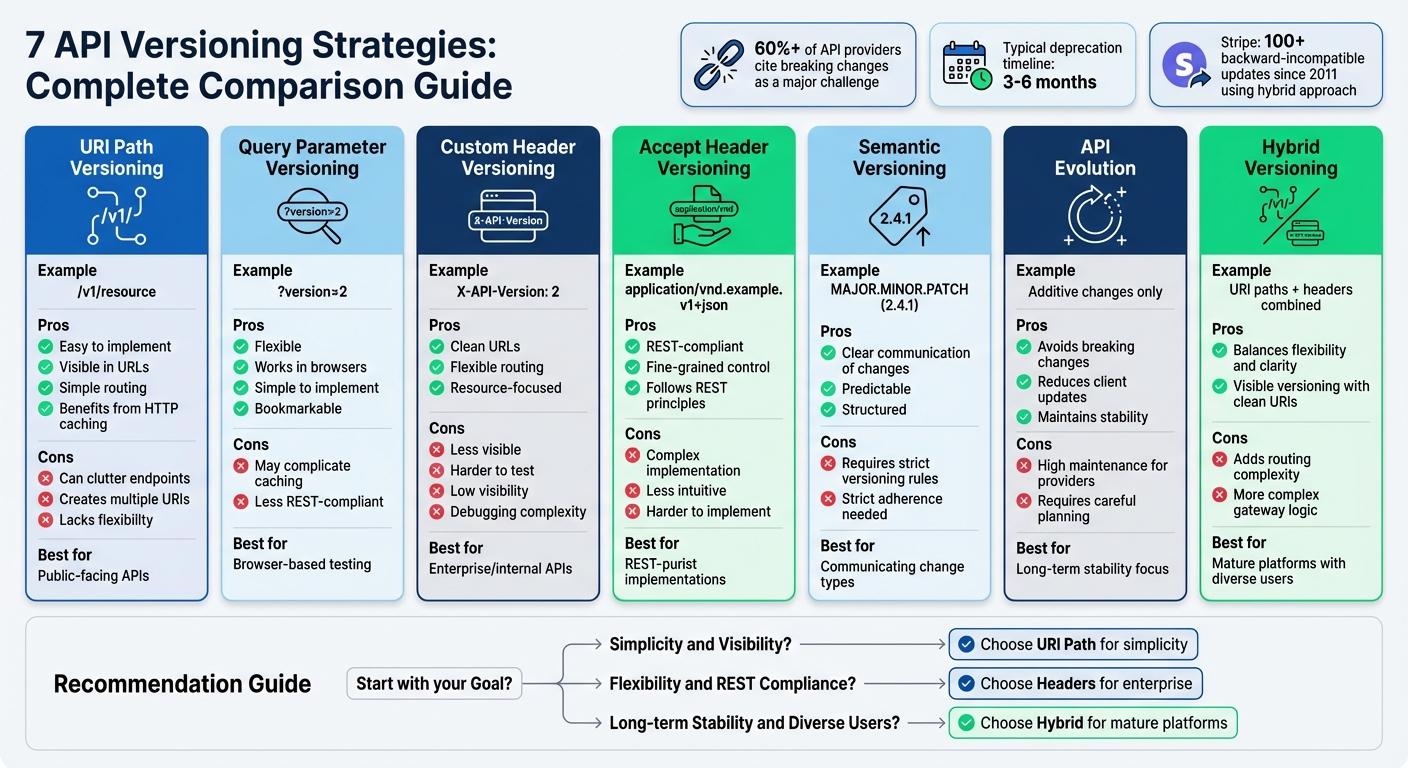
When updating an API, maintaining compatibility while introducing new features can be challenging. API versioning helps avoid breaking existing integrations, ensuring stability for users. Here's a quick overview of seven key strategies:
- URI Path Versioning: Add version numbers to the URL (e.g., /v1/resource). Simple to implement and widely used, but can clutter URIs.
- Query Parameter Versioning: Specify versions as URL parameters (e.g., ?version=2). Flexible but may complicate caching.
- Custom Header Versioning: Use headers like X-API-Version to define versions. Keeps URLs clean but less visible to developers.
- Accept Header Versioning: Embed versioning in the Accept header (e.g., application/vnd.example.v1+json). Follows REST principles but harder to implement.
- Semantic Versioning: Use a MAJOR.MINOR.PATCH format to signal changes. Clear and predictable but requires strict adherence.
- API Evolution: Gradually improve APIs without introducing new versions. Reduces disruption but demands careful planning.
- Hybrid Versioning: Combine methods, like using URI paths for major changes and headers for minor updates. Balances flexibility and clarity.
Each method has trade-offs. For example, URI Path Versioning is simple but may create multiple endpoints, while Header-based strategies align with REST principles but can be harder to debug. Choose a strategy based on your audience, API complexity, and expected changes.
Quick Comparison:
| Strategy | Pros | Cons |
|---|---|---|
| URI Path | Easy to implement, visible in URLs | Can clutter endpoints |
| Query Parameter | Flexible, works in browsers | May complicate caching |
| Custom Header | Clean URLs, flexible routing | Less visible, harder to test |
| Accept Header | REST-compliant, fine-grained control | Complex, less intuitive |
| Semantic Versioning | Clear communication of changes | Requires strict versioning rules |
| API Evolution | Avoids breaking changes | High maintenance for providers |
| Hybrid | Balances flexibility and clarity | Adds routing complexity |
API versioning is a commitment to stability and trust for your users. Select the approach that aligns with your goals and ensures a smooth experience for developers.
API Versioning Strategies | Why and How | URL, Headers, Query Versioning | Live Coding
sbb-itb-622dc24
1. URI Path Versioning
URI path versioning involves placing the version number directly in the URL (e.g., https://api.example.com/v1/resource). This method makes the version highly visible in URLs, logs, and documentation. Major platforms like Twitter, Facebook, and YouTube's Data API use this approach. For example, Twitter's API endpoint looks like this: https://api.twitter.com/1.1/statuses/home_timeline.json.
The version segment in the path (e.g., /v1/ or /v2/) ensures requests are routed to the correct backend service. This works seamlessly with gateways and load balancers, which can direct traffic to specific backend services - even if those services use entirely different technologies.
Backward Compatibility
This method simplifies managing backward compatibility. You can run multiple API versions side by side, each at a different endpoint. For instance, while your /v1/users endpoint remains stable, you can introduce breaking changes in a new /v2/users endpoint. This ensures updates won't disrupt existing integrations with apps or systems.
Ease of Implementation
URI path versioning is one of the easiest strategies to implement. Most web frameworks natively support creating new routes, eliminating the need for custom logic to handle versioning through headers or query parameters. As J Simpson from Nordic APIs explains:
"The most common method of API versioning is to specify the API version in the URI itself. It's the most common method because it's also the most effective".
This straightforward approach also makes it easier to plan for scaling and future updates.
Scalability for Future Versions
Each API version can function as a standalone application or microservice. This setup allows you to scale versions independently based on their usage. For example, you might keep v1 running on the .NET Framework while deploying v2 on .NET 8, enabling a gradual transition to newer technologies. However, managing too many versions can create clutter. To avoid this, establish clear deprecation policies, such as retiring outdated versions within 3–6 months.
Impact on API Consumers
For developers, this method offers practical benefits. They can test endpoints directly in their browsers, and unique URIs improve HTTP caching. While some argue that this approach doesn't fully align with REST principles - since a single resource ideally should have one identifier - the real-world advantages for API development often outweigh these theoretical concerns.
URI path versioning strikes a balance between maintaining integration stability and supporting future growth.
2. Query Parameter Versioning
Query parameter versioning involves adding the version number as a parameter in the URL, such as https://api.example.com/products?version=2 or simply ?v=2. Unlike URI path versioning, this method keeps the base resource path consistent across all versions. It offers flexibility while maintaining a stable resource structure, making it a complementary approach to path-based versioning.
By appending a key-value pair like ?version=2, the server can route requests to the appropriate handler. If no version is specified, the server can default to a stable version - often v1 or the latest release - ensuring older applications remain functional even as new versions roll out.
Backward Compatibility
One of the standout benefits of query parameter versioning is its ability to preserve existing integrations. Since the resource path remains unchanged, legacy clients can continue making requests without any alterations. This approach also allows multiple API versions to coexist, offering developers a smoother transition between versions.
Ease of Implementation
Marwen Abid from xMatters highlights the simplicity of this approach:
"This is a straightforward way of versioning an API from an implementation point of view." – Marwen Abid, xMatters
Many frameworks natively support query parameters, which simplifies routing and eliminates the need for complex logic. The version number is clearly visible in URLs and network logs, making debugging more straightforward. To streamline your code, consider using centralized middleware to read the version from req.query.version and direct requests to the appropriate controller. This avoids scattering version-specific logic throughout your application.
Scalability for Future Versions
While query parameter versioning is easy to set up initially, managing multiple versions can become challenging as your API grows. URLs might get longer, and routing logic could become harder to maintain compared to path-based methods. To keep things manageable, organize your application so version-specific controllers share common business logic, reducing duplication. When retiring older versions, use standard HTTP headers like Sunset and Deprecation to notify users.
Impact on API Consumers
This method works well with standard HTTP tools, clients, and proxies. Developers can even test endpoints directly in their browsers without needing extra tools. However, caching can be tricky - some proxies treat URLs with different query parameters as distinct resources, potentially causing cache fragmentation. To avoid confusion, clearly document how your API handles default versions so consumers know what happens when the version parameter is omitted.
3. Custom Request Header Versioning
Custom Request Header Versioning relies on HTTP headers like X-API-Version: 2 to specify the API version while keeping the resource URI unchanged. Companies such as GitHub, Airbnb, PayPal, and Stripe favor this method for its flexibility and ability to manage compatibility across versions without cluttering the URI.
Backward Compatibility
With this approach, the resource URI remains the same, which avoids breaking clients that have hardcoded URLs. The versioning logic is handled within the request's metadata instead of being embedded in the path. This allows multiple versions of an endpoint to coexist, with an API gateway or backend routing requests to the correct version based on the header value. Developers gain precise control over updates, enabling them to roll out changes incrementally to specific clients or resources without requiring a global URI update.
Ease of Implementation
To implement header versioning, you can parse and validate a dedicated header (e.g., X-API-Version) to determine the request's target version. Using a consistent naming convention and robust error handling for missing or invalid headers is key. Centralizing this logic in middleware or an API gateway simplifies backend management, as the gateway can automatically route requests based on the header. To prevent unexpected behavior, make the version header mandatory - requests without it should return a 400 (Bad Request) error.
This approach, like URI and query parameter versioning, ensures backward compatibility but keeps the URI space clean and organized.
Scalability for Future Versions
Header versioning supports long-term scalability by avoiding the clutter caused by version segments in URIs (e.g., /v1/, /v2/). This aligns with REST principles, where a URI represents a unique resource. API gateways can handle routing to the appropriate backend version, simplifying the management of multiple versions over time. With over 60% of API providers citing breaking changes as a major challenge in API management, header versioning offers a way to minimize disruptions while maintaining a stable URI structure.
Impact on API Consumers
Although custom headers keep URIs clean and stable, they are less visible to developers compared to URI-based versioning. Testing requires tools like Postman or curl since the version information is part of the request metadata, not the URL. This can also complicate caching and debugging. To address these issues, provide clear documentation with examples showing how to include the required headers. Additionally, using standard deprecation headers like Deprecation or Sunset can notify users when a version is being retired. This method is particularly effective for internal or enterprise APIs, where users are typically equipped with the technical knowledge and tools to handle header-based versioning effectively.
4. Accept Header Versioning
Accept Header Versioning builds upon header-based strategies, offering a way to manage versions at the resource level with precision.
This method uses vendor-specific media types, like application/vnd.example.v1+json, to indicate the desired resource version. Major platforms such as GitHub and Heroku rely on this approach to maintain clean URIs while allowing detailed control over resource representations. Instead of versioning the entire API, this technique lets you update specific resources independently, enabling different parts of the API to evolve at their own pace.
Backward Compatibility
One of the key strengths of this approach is that it keeps a single, consistent URI for each resource, aligning with REST principles that a URI should uniquely represent a resource. By embedding version details in the request metadata rather than in the URL, it avoids the fragmentation often caused by path-based versioning. However, to prevent unintended issues, it’s essential to require a version in every request. As the Heroku HTTP API Design Guide explains:
"To prevent surprise, breaking changes to users, it is best to require a version be specified with all requests. Default versions should be avoided as they are very difficult, at best, to change in the future".
Requests that omit a version should return a 400 error, ensuring predictable behavior when updates occur.
Ease of Implementation
This method uses the HTTP Accept header to manage resource versions, offering fine-grained control beyond the broader techniques discussed earlier. API controllers must inspect the Accept header to determine the appropriate resource version to deliver. This involves defining custom media types (e.g., application/vnd.heroku+json; version=3) and implementing content negotiation according to RFC 4288. Testing can be a bit tricky - tools like cURL or Postman are essential since browser-based testing often falls short. For instance, some browsers, including Firefox, may not properly handle enhanced media types, complicating debugging. To address this, provide clear documentation with examples using tools like cURL, and utilize quality parameters (e.g., q or qs) to manage version preferences effectively.
Scalability for Future Versions
By focusing on versioning specific resource representations rather than the entire API, Accept Header Versioning keeps URIs clean and reduces the overall codebase complexity. However, it introduces challenges with caching, as CDNs and proxies must rely on Vary headers to distinguish between versions. Many teams adopt a hybrid strategy - using URI path versioning for major API milestones (e.g., /v1, /v2) while leveraging Accept headers for smaller, resource-specific updates.
Impact on API Consumers
This approach places more responsibility on API consumers, who must be familiar with managing HTTP headers. This can make it less accessible for simpler use cases or quick browser-based tests. As Lokesh Gupta from RESTfulAPI.net points out:
"The result tends to be a more complex API as clients have to know which headers to specify before requesting a resource".
To ease this complexity, it’s helpful to log and tag metrics by the version specified in the header, allowing you to track clients using outdated versions. While this method aligns closely with REST principles and keeps URLs tidy, it demands more effort from API consumers compared to the straightforward nature of URI path versioning. Its resource-specific focus naturally leads into hybrid strategies, which will be explored next.
5. Semantic Versioning
Semantic Versioning (SemVer) takes a straightforward, numeric approach to managing API changes. Using a three-part numbering system - MAJOR.MINOR.PATCH - it conveys the type of updates made. For instance, version 2.4.1 indicates the second major release, where the minor version reflects new, backward-compatible features, and the patch addresses bug fixes.
Backward Compatibility
SemVer makes it clear how API changes affect users. As long as the MAJOR version remains the same, updates to the MINOR or PATCH numbers ensure backward compatibility. This allows developers to specify version constraints like ^1.2.0 and safely receive updates that won’t break their applications. However, introducing breaking changes - such as removing endpoints, altering required parameters, or changing response structures - requires incrementing the MAJOR version. This signals to users that manual updates and testing will be necessary.
| Version Type | When to Increment | Impact on Consumer |
|---|---|---|
| MAJOR (X.0.0) | Breaking changes (e.g., removing endpoints) | Breaking: Requires manual updates and testing |
| MINOR (x.Y.0) | Adding new backward-compatible features (e.g., new endpoints) | Non-breaking: Safe for automatic updates |
| PATCH (x.y.Z) | Bug fixes that maintain compatibility | Non-breaking: Safe for automatic updates |
Ease of Implementation
This numbering system makes communicating updates simple. As SemVer.org puts it:
"By giving a name and clear definition to the above ideas, it becomes easy to communicate your intentions to the users of your software".
Tools like openapi-diff and semantic-release can automate version management, tagging Git releases, and detecting breaking changes. The rules are straightforward: bump PATCH for bug fixes, MINOR for new features, and MAJOR for breaking changes. During early development, versions in the 0.y.z phase allow for rapid iteration until the API reaches its first stable release at 1.0.0.
Scalability for Future Versions
SemVer supports incremental updates while maintaining stability. Pre-release tags like -alpha or -beta allow developers to test new versions without committing to them fully. For large systems, hybrid versioning can be applied, where individual components are versioned independently, while an overall artifact version ties everything together. This method lets developers update specific parts of the API without requiring all users to upgrade at once. As Miquel Palet from getlate.dev explains:
"The core benefit of SemVer is not just versioning; it's communication. It creates a contract between the API provider and the consumer, clearly defining the risk associated with updating to a new version".
Impact on API Consumers
For API consumers, SemVer offers predictability by clearly marking when breaking changes occur, reducing the risk of unexpected disruptions. It also simplifies dependency management by enabling flexible version ranges, such as specifying "greater than 3.1.0 but less than 4.0.0". Stripe highlights the importance of this clarity:
"An API represents a contract for communication that can't be changed without considerable cooperation and effort".
When followed consistently, SemVer allows consumers to automate updates for MINOR and PATCH releases, while reserving MAJOR updates for manual intervention. Up next, we’ll look at how hybrid versioning strategies can offer even more control and flexibility.
6. API Evolution
API evolution focuses on improving your API over time without requiring users to switch to entirely new endpoint versions. Instead of rolling out separate versions like /v1/ and /v2/, this method involves making incremental updates to the existing API while ensuring backward compatibility. The goal is to add new features, endpoints, or optional parameters without disrupting what’s already in place.
Backward Compatibility
Backward compatibility is the backbone of API evolution. Unlike traditional versioning, which often introduces isolated updates, this approach builds on the existing structure to ensure a smooth transition. Hybrid versioning takes this concept further by combining additive changes - such as adding fields, optional parameters, or new endpoints - while keeping current functionality intact. Instead of renaming or removing properties, which could break integrations, you can introduce new optional fields and phase out older ones over time. This process also requires understanding the "invisible contract", which acknowledges that users may rely on undocumented or unintended aspects of your API.
| Change Type | Impact | Evolutionary Strategy |
|---|---|---|
| Adding optional field | Non-breaking | Deploy to current version |
| Renaming a field | Breaking | Add new field, deprecate the old one gradually |
| Adding new endpoint | Non-breaking | Deploy to current version |
| Changing data type | Breaking | Add new field with updated type, sunset old one |
| Removing endpoint | Breaking | Use a long-term sunset policy (90+ days) |
Ease of Implementation
Designing APIs with extensibility in mind is key to smooth evolution. Flexible data types like objects or enums offer more adaptability than fixed types. Automated validation through CI tools ensures that requests and responses remain consistent. Additionally, feature flags allow you to roll out new features gradually, collecting feedback without disrupting existing integrations. As DreamFactory puts it:
"Swap models without re-wiring. Keep the plumbing steady while models evolve".
Scalability for Future Versions
API evolution is better suited for long-term scalability because it avoids the chaos of managing multiple active versions, each requiring separate maintenance and testing. Traditional versioning often leads to "version sprawl", where duplicate routes and logic become a maintenance headache. By contrast, evolutionary APIs maintain a static URL structure while continually expanding capabilities. For example, Stripe has successfully used a date-based evolution approach (e.g., "2024-10-01") to manage nearly 100 backward-incompatible upgrades since 2011. Public APIs often offer a deprecation grace period of 90–180 days, while many companies support older versions for at least two years.
Impact on API Consumers
For developers, API evolution reduces disruption and builds confidence in the API’s stability. Consumers can maintain their existing integrations without needing to rewrite code or migrate to new endpoints unless they choose to adopt new features. This approach reduces the support burden and ensures reliable, long-term integrations. As Apidog puts it:
"Change is inevitable, but breaking your consumers doesn't have to be".
7. Hybrid Versioning
Hybrid versioning builds on the idea of incremental API evolution by combining strategies to handle both major changes and minor tweaks. It strikes a balance between visibility and flexibility, making it easier to manage APIs over time.
This approach typically uses URI path versioning for large-scale changes - like overhauling authentication systems or restructuring resources - while relying on headers or date-based methods for smaller updates. For example, you might see endpoints like /v1/charges or /v2/charges for major revisions, while the finer changes remain tucked away in headers, keeping URLs clean and straightforward.
Stripe has been a pioneer in using this method since 2011. They pin minor updates to specific dates while reserving URI path changes for significant shifts. By default, users are tied to the latest version when they make their first request but can manually specify a different version using the Stripe-Version header. Stripe’s approach has allowed them to roll out nearly 100 backward-incompatible updates without breaking existing integrations. As Stripe’s engineers put it:
"Just like a power company shouldn't change its voltage every two years, we believe that our users should be able to trust that a web API will be as stable as possible."
Backward Compatibility
One of hybrid versioning’s strengths is its ability to maintain backward compatibility. Older URI path versions remain intact, even as new ones are introduced. This makes it possible to reserve URI changes for major updates - like switching from OAuth 1.0 to OAuth 2.0 - while handling smaller adjustments through headers. This layered approach ensures that developers can adopt changes at their own pace without worrying about sudden disruptions.
Ease of Implementation
To make hybrid versioning work, you need a central gateway capable of resolving versions from different sources, such as URIs, headers, or query parameters. GitHub is a great example of this in action. They use custom media types in the Accept header (e.g., application/vnd.github.v3+json) alongside a custom request header (X-GitHub-Api-Version). This keeps their URIs clean while allowing explicit version control. Additionally, response adapters transform updated responses into legacy formats, giving developers extra time to transition without halting internal progress.
This setup ensures that hybrid versioning doesn’t just work - it scales effectively.
Scalability for Future Versions
Hybrid versioning avoids the chaos of creating endless new URI paths for every minor change. Instead of cluttering endpoints with versions like /v3, /v4, and /v5, headers or behavior flags can handle incremental updates. As AverageDevs explains:
"Many mature platforms do both: path versions for 'eras,' then header versions or behavior flags for resource-level evolution."
This approach is particularly useful for established platforms with diverse user bases. With over 60% of API providers citing breaking changes as a major challenge, hybrid versioning provides a structured way to manage updates without overwhelming developers.
Impact on API Consumers
For API consumers, hybrid versioning offers the best of both worlds: stable, predictable endpoints for major integrations and seamless access to new features through headers. URI paths clearly indicate major versions, making them easy to discover, while headers provide granular control over updates.
That said, managing multiple versioning methods can add complexity. To simplify things, it’s a good idea to offer versioned SDKs that abstract these details. Use standard headers like Deprecation: true and Sunset (with ISO dates) to warn users about upcoming retirements. Additionally, tagging logs and metrics by version and client ID helps identify users on outdated versions, allowing for proactive communication and support.
Comparison Table
The table below highlights the trade-offs among commonly used API versioning strategies, weighing factors like clarity, ease of use, and alignment with REST principles.
URI Path Versioning stands out for its simplicity and clarity - developers can easily spot differences like /v1/users versus /v2/users in the URL. However, this approach results in multiple URIs for the same resource. On the other hand, header-based strategies, such as using custom headers or Accept headers, keep URIs clean and align more closely with REST principles. But they come with challenges, such as being harder to test in browsers and less visible to developers.
API Evolution avoids breaking changes by focusing on additive updates, which shifts the responsibility of maintaining compatibility to the API provider. Meanwhile, Semantic Versioning uses a structured numbering system (Major.Minor.Patch) to clearly indicate the nature of changes, with major version updates signaling breaking changes. The table below offers a concise reference to help you decide which approach fits your API's requirements.
| Strategy | Key Advantages | Key Disadvantages |
|---|---|---|
| URI Path | Easy to understand; benefits from HTTP caching; simple routing | Creates multiple URIs; lacks flexibility |
| Query Parameter | Simple to implement; works well in browsers; bookmarkable | Struggles with caching; less aligned with REST principles |
| Custom Header | Keeps URIs clean; flexible routing; resource-focused | Low visibility; harder to debug; testing is more complex |
| Accept Header | Closely follows REST principles; supports fine-grained versioning | Difficult to implement; less intuitive for developers |
| Semantic Versioning | Clearly communicates change types (additive vs. breaking) | Requires strict adherence; doesn’t define delivery methods |
| API Evolution | Avoids breaking changes; reduces client-side updates | High maintenance burden for API providers |
| Hybrid | Combines visible versioning with clean URIs for minor updates | Adds complexity to routing and gateway logic |
This breakdown helps clarify the strengths and weaknesses of each strategy, making it easier to choose the one that aligns best with your goals and constraints.
Conclusion
Choosing the right API versioning strategy depends entirely on your project's specific needs. URI path versioning stands out for its simplicity and visibility, making it a great choice for public-facing APIs. On the other hand, header-based strategies keep URLs tidy and work well in enterprise settings. Semantic versioning offers a structured way to communicate changes, while API evolution focuses on maintaining backward compatibility through incremental updates.
Your decision should weigh factors like who your audience is, caching requirements, and the type of changes you expect to make. For instance, public APIs catering to a wide range of clients often benefit from the straightforward nature of URI versioning. Internal APIs, however, might lean toward header-based methods. Mobile applications, in particular, demand extended support for older versions to meet user expectations. It’s worth noting that over 60% of API providers identify breaking changes as one of their biggest challenges in API management. This highlights the importance of thoughtful planning when it comes to versioning.
As one industry insight puts it:
"API versioning isn't about the trendiest header or the prettiest number. It's about earning trust through predictable evolution." - averagedevs.com
At Appeneure, we've seen firsthand how early, tailored decisions about versioning can save time and resources down the road. With over 100 clients relying on our mobile and AI-powered app solutions, we’ve adopted versioning strategies that balance innovation with stability. Our experience has shown that choosing a versioning approach during the design phase can avoid costly reworks later.
API versioning is more than just a technical decision - it’s a commitment to your users. By setting clear deprecation timelines (typically 3 to 6 months' notice), using API gateways for centralized management, and providing thorough documentation, you can roll out updates with confidence. This approach ensures you improve your platform while safeguarding the trust and investment your users have placed in it.
FAQs
What’s the best way to choose an API versioning strategy for my project?
Choosing the right API versioning strategy depends on what your project needs, who’s using your API, and how you plan to manage updates over time. Factors like simplicity, backward compatibility, and your approach to updates and deprecations play a big role in the decision.
One of the most common approaches is URL versioning (e.g., /v1/). It’s straightforward, easy to test, and widely understood by developers. If you prefer a more streamlined structure, you might consider header-based versioning. While it offers a cleaner design, it can introduce challenges, especially with caching and testing. For APIs that need to remain stable over many years, using headers for explicit version declarations can help maintain consistency while allowing for gradual changes.
The key is to pick a strategy that aligns with your project’s goals and reduces disruptions for users. Just as important is clear communication with your clients about version updates and deprecations, ensuring a smooth transition whenever changes occur.
What are the key differences between using URI path versioning and header-based versioning for APIs?
When it comes to API versioning, the choice between URI path versioning and header-based versioning boils down to three main factors: visibility, flexibility, and ease of use.
With URI path versioning, the version number is directly embedded in the URL, like /v1/resource. This approach makes the version highly visible, which is great for clients and intermediaries to quickly identify. It's also caching-friendly, which can improve performance. However, the trade-off is that it can clutter URLs and require entirely new paths for major updates.
In contrast, header-based versioning moves the version information into custom headers, such as API-Version: 1.0. This keeps URLs clean and allows APIs to evolve more easily without having to modify endpoint URLs. But this comes with its own challenges: it makes versioning less obvious to clients and intermediaries, which can complicate caching and debugging processes.
To sum it up, URI path versioning is straightforward and transparent but can lead to more complex URLs. Meanwhile, header-based versioning provides cleaner URLs and more adaptability, though it sacrifices some visibility and simplicity when troubleshooting.
What’s the best way to keep my API compatible with older versions while making updates?
When updating your API, maintaining backward compatibility is crucial. To achieve this, consider using versioning strategies like URI paths, custom headers, or query parameters. These methods help manage changes without disrupting existing users.
Focus on additive changes - such as adding new fields or endpoints - rather than altering or removing existing ones. This approach minimizes the risk of breaking functionality for users relying on older versions.
Thorough testing across all versions is essential to catch potential issues early. Additionally, provide clear documentation and give users advance notice of any planned deprecations. This proactive communication ensures a smoother transition for everyone working with your API.
More from the studio

