
All blogs
AI App Development
AI Risk Management for MVP Development
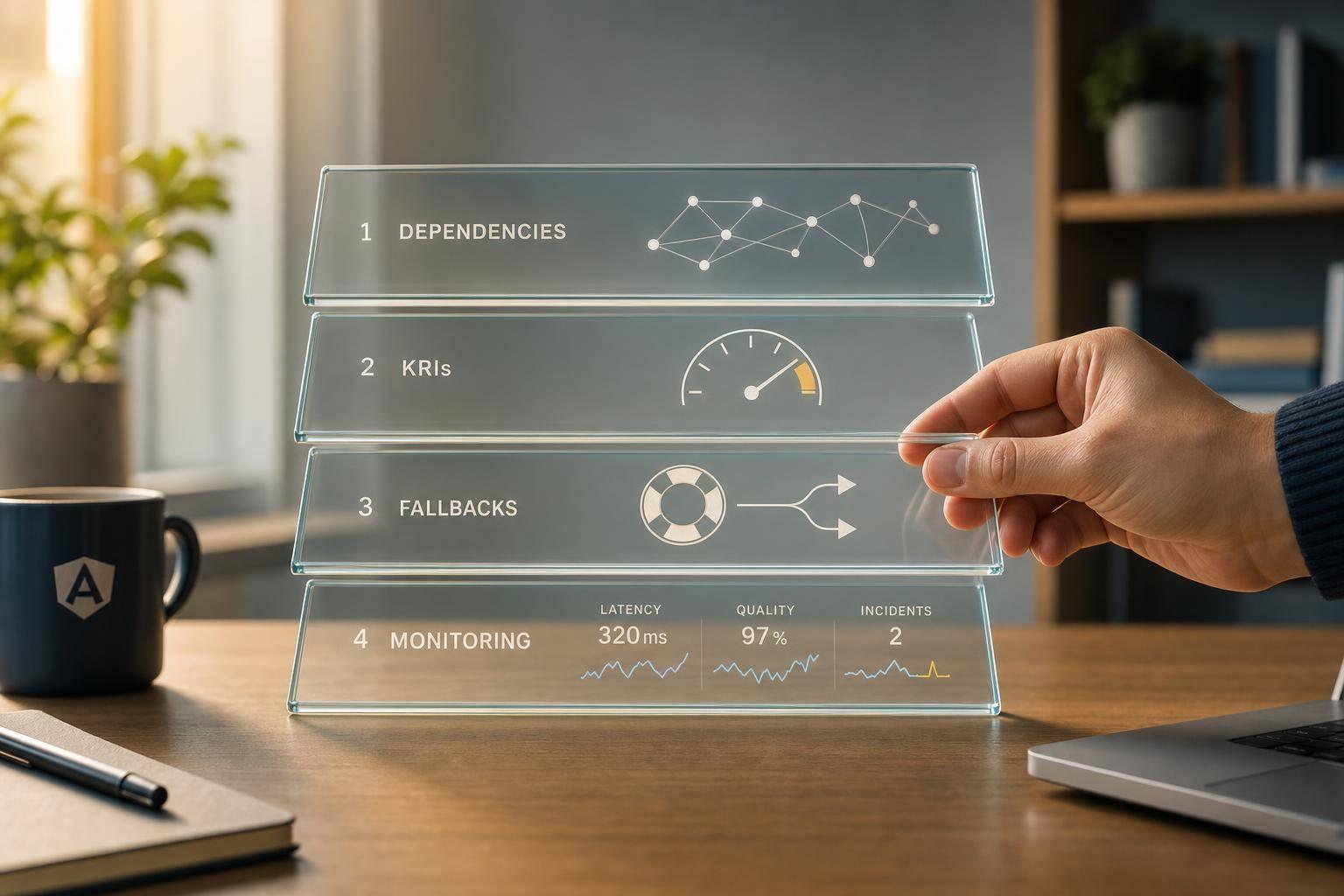
Lean risk process for AI-powered MVPs: map dependencies, set KRIs, add fallbacks, and monitor latency, quality, and incidents from beta.
16 min read
AI Risk Management for MVP Development
If your AI MVP can give wrong answers, leak user data, or stall for 3 to 5 seconds in a core flow, I’d treat that as a launch risk now, not a post-launch fix. For a small mobile team, the shortest path is simple: map each AI feature, score its main failure risks, add a fallback, and watch a few hard metrics from beta onward.
Here’s the article in plain English:
- I focus on the AI risks that can hurt trust, retention, or core app flows
- I use a light process based on ISO/IEC 23894 and NIST AI RMF
- I check risks during idea, build, and beta, not after release
- I list dependencies early, because many failures start with APIs, SDKs, data feeds, or network issues
- I track a small set of KRIs like timeout rate, negative feedback rate, override rate, and task completion
- I add safeguards such as timeouts, retries, circuit breakers, cached fallbacks, input checks, output checks, and kill switches
- I set hard thresholds like p95 time to first token under 1.5 seconds, alerting if it goes above 3 seconds for 5+ minutes, and treating AI API failures above 3% in 30 minutes as an incident
- I keep a simple post-launch system: dashboards, incident playbooks, sampled output reviews, and a change log for prompts, models, and configs
The main point: I don’t need a heavy process to lower AI risk in an MVP. I need a short sprint routine that catches the most damaging failures early, keeps the app usable when AI breaks, and gives the team clear rules for when to roll back, turn off, or route to a non-AI path.
That’s what this article lays out from start to finish.
Map AI Risk Frameworks to the MVP Lifecycle
The goal here is simple: take the risks you already found and turn them into a sprint routine your team can repeat. ISO/IEC 23894 and the NIST AI Risk Management Framework (AI RMF) give small teams a clear way to handle AI risk inside normal product work - without dragging down launch.
Use ISO/IEC 23894 as a Simple Risk Process
ISO/IEC 23894 applies the ISO 31000 risk approach to AI systems. It covers the full lifecycle, from design and data collection to deployment, monitoring, and decommissioning. For an MVP team, that doesn’t need to become a giant company audit. The practical move is much simpler: turn it into a feature-level checklist and run it once for each AI feature in each sprint.
For each feature, walk through six steps in one working session:
- Define scope: Name the feature, the model or API it uses, the data it touches, and the users it affects.
- Set risk criteria: Pick clear thresholds, like P95 latency, accuracy targets, and prohibited-output rules.
- Identify risks: List failure points such as biased outputs, PII exposure, API timeouts, or hallucinated content.
- Analyze and prioritize: Score each risk on a simple 1–3 scale for impact and likelihood. High-impact, high-likelihood issues like PII leakage or unsafe content generation should go straight into the backlog as mitigation tasks.
- Choose controls: Use low-friction fixes like rate limiting, content filters, data minimization, or human review for edge cases.
- Plan monitoring: Track latency, error rate, and safety incidents in a basic dashboard, then review them during retrospectives.
That’s the whole idea. Not paperwork for its own sake. Just a short, repeatable process teams can run without making it a whole production.
Apply NIST AI RMF Across Idea, Build, and Beta Stages
The NIST AI RMF is voluntary and flexible, which makes it a strong fit for lean teams that want structure without heavy governance. Its four functions - Govern, Map, Measure, and Manage - fit neatly into the way MVP teams already work.
Here’s how those same controls map across idea, build, and beta stages:
| NIST Function | Idea Stage | Build Stage | Beta Stage |
|---|---|---|---|
| Govern | Assign a feature owner; write a one-page risk summary | Review ethical and safety considerations in design discussions | Define who triages AI incidents and approves model changes |
| Map | Document users, data sources, and potential impacts | Create a simple risk canvas per feature | Validate assumptions with real usage data |
| Measure | Set minimum accuracy, latency, and fairness metrics | Run test datasets and benchmark against thresholds | Track metrics in dashboards; add adversarial prompt tests |
| Manage | Identify fallback options | Implement guardrails and data protections | Run risk reviews in retrospectives; update controls after incidents |
In practice, you usually don’t need much more than a one-page risk canvas, a short model card, and an incident log inside your current issue tracker. For most MVP teams, that’s enough to show responsible AI practices without piling on extra process.
Add AI Risk Checks to Agile Delivery
Once you’ve set the framework, fold it into day-to-day delivery. The easiest way to do that is to attach risk work directly to backlog items instead of running a separate track on the side. During backlog grooming, add a short risk note to every AI-related story: what could go wrong, what control is needed, and whether the story touches a high-risk area like health or finance. If mitigation work is needed, split it into its own estimable task so it doesn’t disappear inside feature delivery.
During sprint planning, add risk acceptance criteria to story definitions. That can be as direct as "P95 latency under 1 second", "no PII logged," or "safety filter blocks harmful content." Before release sign-off, check that every AI story meets its criteria, no high-severity incidents are still open in the log, and monitoring dashboards are live.
The point is to run these checks inside normal Agile ceremonies, so risk stays part of delivery instead of turning into a separate workflow.
sbb-itb-622dc24
Find AI Dependencies and Failure Modes Early
Once your risk process is set, the next move is simple: map the dependencies that can break it.
Most AI failures in mobile MVPs don’t start at the model. They start upstream. A data feed breaks. An API gets rate-limited. An SDK changes quietly in the background. Suddenly, the AI feature starts acting off, even though nothing looks broken at first glance.
List Every AI Dependency in the App Stack
A clean way to map the AI stack is to sort it into four buckets: inputs, models and logic, infrastructure, and third-party dependencies.
Inputs include everything feeding the AI feature: user text, images, voice recordings, GPS or accelerometer data from the device, and outside data pulls like pricing feeds or health data. Any one of these can fail in its own way. Data can be noisy. Permissions can be missing. A preprocessing step can fail and poison the result before the model even gets a chance to run.
Models and logic covers your LLM APIs, embedding services, recommendation engines, on-device ML components, and any prompt templates or agent workflows linking them together. For each one, document the provider, expected latency, version, and any hard limits, such as "no PHI" or "no financial advice."
Infrastructure includes API gateways, rate-limiting rules, vector databases, monitoring pipelines, and CI/CD systems that ship AI-related changes. Third-party dependencies refers to external SDKs, open-source ML libraries, and any analytics or moderation tools that quietly shape AI behavior.
Map each dependency to the product flow it supports, like onboarding, search, chat, moderation, or notifications. Start with the MVP’s highest-risk flows. If you do this during design review, you can spot single points of failure before launch instead of after users hit them.
Common Failure Modes in AI-Powered MVPs
Once the dependency map is done, the next step is getting clear on what can go wrong. Each failure mode affects the business in a different way.
| Failure Mode | Typical Triggers | Impact on Users | Impact on Business |
|---|---|---|---|
| Model drift | Shifts in user language; new product categories; training data not updated. | Recommendations feel irrelevant; subtle frustration builds. | Gradual drop in retention; lower conversion; higher data curation costs. |
| Hallucinations | Open-ended prompts; missing verification steps; over-reliance on generative models for factual tasks. | Users receive wrong guidance; trust erodes quickly after even one bad answer. | Reputation risk; legal exposure in health or finance contexts; added human review layers. |
| Silent quality drops | SDK updates; upstream data format changes; unnoticed prompt or parameter changes. | App "feels worse" over time; users silently churn or leave lower ratings. | Hard-to-diagnose KPI drops; time-consuming root cause analysis; rising support load. |
| Integration cascade failures | API response format changes; network timeouts; schema mismatches between services. | Intermittent errors in key flows like onboarding or search; users abandon tasks. | Engineering firefighting; delayed releases; need for defensive coding and contract tests. |
| Over-automation | No escalation paths; unrealistic accuracy assumptions; full auto-moderation with no manual review. | Legitimate users get blocked; harmful content slips through; users feel misjudged. | Higher support escalations; brand and safety concerns; retroactive cost of adding human review. |
| Policy/compliance violations | Weak content filters; vague prompts; missing data governance controls. | Users exposed to disallowed or sensitive content. | Regulatory scrutiny; legal risk; forced feature rework before or after launch. |
| Third-party outages and rate limits | Provider infrastructure issues; hitting rate limits; sudden quota changes. | Features become slow or unavailable; users perceive the app as broken. | Lost engagement; emergency hotfixes; costly architectural changes to reduce dependency. |
One failure mode deserves extra attention: silent quality drops. These are tough because your uptime dashboards can stay green while the user experience gets worse.
Use Key Risk Indicators to Catch Problems Before Scale
Key risk indicators, or KRIs, don’t need to be fancy. You just need a small set of metrics that tell you something is off before users complain or support tickets pile up. Each KRI should connect back to one failure mode in the table above.
For a conversational feature, track:
- Negative feedback rate such as downvotes or "not helpful" clicks
- Timeout rate
- Human override rate, meaning how often staff reject the AI suggestion
For recommendation or search features, watch task completion rate and click-through on AI-surfaced results. If moderation is involved, track moderation flag rate.
Put these KRIs in your current analytics dashboard. Use early beta data to set a baseline for what “normal” looks like. Then set simple alerts for meaningful changes. If timeout rate doubles in a short window, or task completion drops right after a deployment, that should trigger an immediate check, not a note for the next sprint.
Each KRI should lead to a clear action. A spike in negative feedback usually points to prompt review or model configuration. Rising timeouts can signal provider latency, weak caching, or the need for a graceful fallback response. Strange moderation flag patterns can mean new abuse behavior is slipping past filters. More human overrides usually mean staff no longer trust the output, which is a strong sign that retraining, prompt tuning, or a narrower AI scope is overdue.
If your MVP team is stretched thin, don’t overthink it. A short weekly review of a few charts, with product and engineering looking at them together, is often enough to catch problems before they snowball.
Use these KRIs to decide which fallback or safeguard each AI feature needs.
Build Controls, Fallbacks, and Safeguards for AI Features
Use simple controls so AI features stay usable when models fail, without dragging out launch. Let the KRIs from the previous section set each fallback threshold and safe default. They should also tell you which features need a hard stop, which can fall back safely, and which need human review.
Build Fallback Paths into Core App Flows
Every AI feature in your MVP needs a clear answer to three basic questions. What happens after a 3- to 5-second timeout? What does the user see when the model fails? Is a cached or rule-based response good enough for this task?
For most mobile MVPs, the fallback stack is pretty simple: make the AI call once, add a short retry with exponential backoff if the failure seems transient, then route to a cached answer, rule-based fallback, human review, or a safe unavailable message. If failures pass a set threshold, open the circuit breaker and send traffic to the fallback path. The point is simple: a fallback should keep onboarding, search, chat, or checkout working - not just throw an error.
The big call is whether a wrong answer could hurt the user. That tells you if the feature should block the request, return a safe fallback, or allow a degraded response. For brainstorming or content-drafting features, lower-quality output is annoying, but not dangerous. For anything tied to health guidance, financial decisions, or legal advice, stop the AI flow and route the user to a human reviewer, a static help article, or a message that the system cannot help with that request right now. Write this down in a lightweight risk matrix that maps each AI feature to its harm level and fallback behavior.
These fallback choices should line up with the risk levels you already mapped for each feature.
Cut Data, Model, Privacy, and Security Risk
The controls with the biggest payoff here are often the cheapest ones to put in place early. Input validation should run before any data reaches the model. Block prompt injection attempts, reject oversized payloads, filter unsupported file types, and sanitize malformed inputs. That stops a lot of common abuse before it starts.
Minimum-necessary data collection is both a privacy rule and a cost control. Only send the data the AI task needs. That cuts spend, shrinks audit scope, and limits privacy exposure. API keys and secrets should never live inside the mobile app. Use secure storage and key management instead.
You also need to validate every AI output before display. Check each response against a schema or content policy. Does it include prohibited content, unsafe instructions, or data that should not be shown to this user? A validation layer that flags or blocks non-compliant outputs is a practical safeguard at the MVP stage.
Choose Controls Based on Risk, Cost, and UX Impact
Use the risk level in each flow to decide how much control it needs. A simple way to think about it is in three tiers:
- Must-have protections for safety and privacy
- Recommended protections for quality and reliability
- Nice-to-have improvements for a later release
The goal isn't full governance maturity. It's the smallest set of controls that protects launch-critical flows. A fallback screen, input validation, and a feature kill switch do a lot of the heavy lifting at low cost.
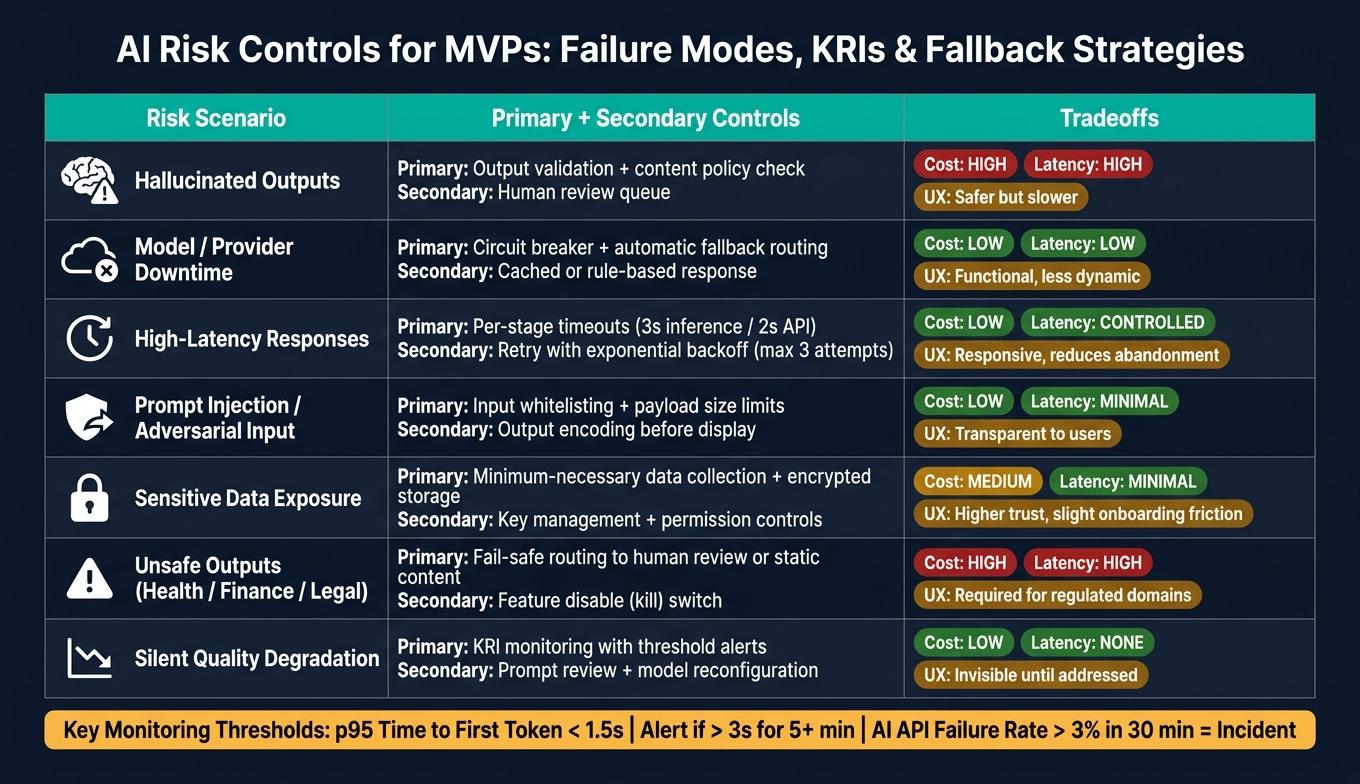
The table below maps common AI risks to their primary and secondary controls, along with the tradeoffs in cost, latency, and UX.
Mitigation Strategies for Common AI Risks in MVPs
| Risk Scenario | Primary Control | Secondary Control | Tradeoffs (Cost, Latency, UX) |
|---|---|---|---|
| Hallucinated outputs | Output validation + content policy check | Human review queue | Cost: Higher; Latency: High; UX: Safer but slower |
| Model or provider downtime | Circuit breaker with automatic fallback routing | Cached or rule-based response | Cost: Low; Latency: Low; UX: Functional, but less dynamic |
| High-latency AI responses | Per-stage timeouts (3 seconds for inference, 2 seconds for external API) | Retry with exponential backoff, up to 3 attempts | Cost: Low; Latency: Controlled; UX: Responsive; reduces user abandonment |
| Prompt injection or adversarial input | Input whitelisting + payload size limits | Output encoding before display | Cost: Low; Latency: Minimal; UX: Transparent to users, but rules need updates |
| Sensitive data exposure | Minimum-necessary data collection + encrypted storage | Key management + permission controls | Cost: Medium; Latency: Minimal; UX: Higher trust, slight onboarding friction |
| Unsafe outputs in high-risk domains | Fail-safe routing to human review or static content | Feature disable switch | Cost: High if human-staffed; Latency: High; UX: Needed for health or finance use cases |
| Silent quality degradation | KRI monitoring with threshold alerts | Prompt review + model reconfiguration | Cost: Low; Latency: None; UX: Invisible to users until addressed |
After launch, tune these controls using live usage data and incident logs.
Run AI Risk Management After Launch
Monitor Drift, Quality, Latency, and User Impact
Once your fallbacks are live, turn them into clear monitoring thresholds, alerts, and rollback rules. That gives the team something concrete to act on when things start to slip.
For a small team, a practical monitoring setup usually covers five areas:
- Application performance monitoring (APM) for latency, error rates, and resource usage on each AI endpoint
- AI output logging with sampling so you can review a daily or weekly batch of responses against quality rubrics for relevance, correctness, tone, and safety
- Drift indicators to watch for changes in the mix of user inputs and model outputs over time
- Funnel analytics that connect AI-powered screens to product-flow metrics like completion rates and churn after AI errors
- User feedback channels such as in-app "report issue" buttons, support tickets tagged "AI-related", and app store review monitoring
Set a baseline for your negative feedback rate, then alert on a sustained spike. For latency, a good starting point is p95 time to first token under 1.5 seconds, with an alert if it goes past 3 seconds for more than 5 minutes. If your AI API failure rate goes above 3% in any 30-minute window, treat it as an incident.
Those thresholds shouldn't just sit in a dashboard. They should connect straight to your feature flags. If quality or reliability drops below target, cut AI exposure to a smaller share of traffic or switch people back to a non-AI flow until the issue is fixed.
When a metric crosses a threshold, the next move should be an incident playbook, not a debate.
Set Up an AI Incident Response and Change Log Process
Build a playbook for unsafe output, bad outputs in sensitive domains, data leakage, and model, provider, or API outages. Each playbook entry should spell out four things: how the issue gets detected, the immediate containment step, a plain-language user communication template, and the follow-up process for root cause analysis, remediation, and documentation.
Severity tiers matter here. A small UX drop can stay within product and engineering. Anything that touches privacy, safety, or possible legal exposure should move up to founders or legal advisors right away.
Clear ownership keeps the response moving. Engineering triages alerts and handles containment. Product decides when to degrade or remove AI features and writes user-facing messaging. QA checks the fix and expands regression tests so the same problem doesn't pop up again.
You also need a record of every AI behavior change: prompt updates, model version switches, dataset changes, policy adjustments, and configuration changes. Each log entry should include the date, owner, type of change, a description or diff, the reason or hypothesis, affected features, and links to before-and-after metrics.
That log speeds up root-cause analysis. It also makes compliance reviews much easier because it shows data sources, preprocessing steps, and retention decisions in one place.
Conclusion: A Lean Risk System for Faster, Safer MVPs
After launch, keep the same risk system running through metrics, incidents, and change logs. The idea is simple: identify AI dependencies early, map risk checks to each MVP stage, design fallbacks before launch, and monitor from the first release. Launch monitoring then feeds the next sprint.
Use those signals to assign ownership and set review cadence.
Operational AI Risk Practices for MVP Teams
| Practice | Owner | Frequency | MVP-Stage Priority |
|---|---|---|---|
| AI metrics dashboard review (latency, error rates, quality) | Engineering | Daily | Critical from first beta |
| Sampled output and user complaint review | Product + QA | Weekly | Critical from first beta |
| AI change log update (prompts, models, configs, policies) | Engineering | Per release / per change | Critical from first beta |
| Incident response and postmortem documentation | Engineering + Product | Per incident | Critical from first beta |
| Guardrail and fallback path testing | QA | Per release | Critical from first beta |
| Drift detection and threshold review | Engineering | Weekly | Important after initial traction |
| Feature flag and rollout decision review | Product | Per sprint | Important after initial traction |
FAQs
How do I prioritize AI risks in an MVP?
Prioritize AI risks with a proactive, systematic approach. Start with high-risk AI features early so you have time to test other options if something falls short. At the same time, map dependencies - like data quality, user behavior tracking, or pre-trained models - so blockers don’t sneak up on you later.
Use MoSCoW to define what’s a must-have, should-have, could-have, or won’t-have. Then switch to RICE once you have data from actual use. Build evaluation into each step: review failure modes, measure outputs in a simple way, and validate AI results with human feedback.
Which AI features need a fallback path?
AI features need a fallback path when they rely on a set accuracy threshold. A simple example is image classification that uses a fixed percentage to decide whether the result counts as a success or a failure.
A fallback is the safety net. If the model misses that mark, the app can still work in a way that feels useful to the user instead of just breaking or returning a bad result.
Appeneure stresses finding these dependencies early. That way, your MVP stays reliable even when core AI features don’t perform as expected.
What metrics should I track after launch?
Track metrics that show how people use the product and how well it performs, such as:
- daily active users
- session duration
- retention rates
It also helps to watch AI-specific goals. For example, you might aim to cut bounce rates by 15% or improve customer satisfaction by 25%. On top of that, use real-time monitoring and threat detection to spot anomalies early and help support security.
More from the studio

