
All blogs
AI App Development
AI Development Tooling & Workflows
AI tools speed mobile app development, doubling productivity and enabling rapid prototyping—while requiring human oversight.
13 min read

AI Development Tooling & Workflows
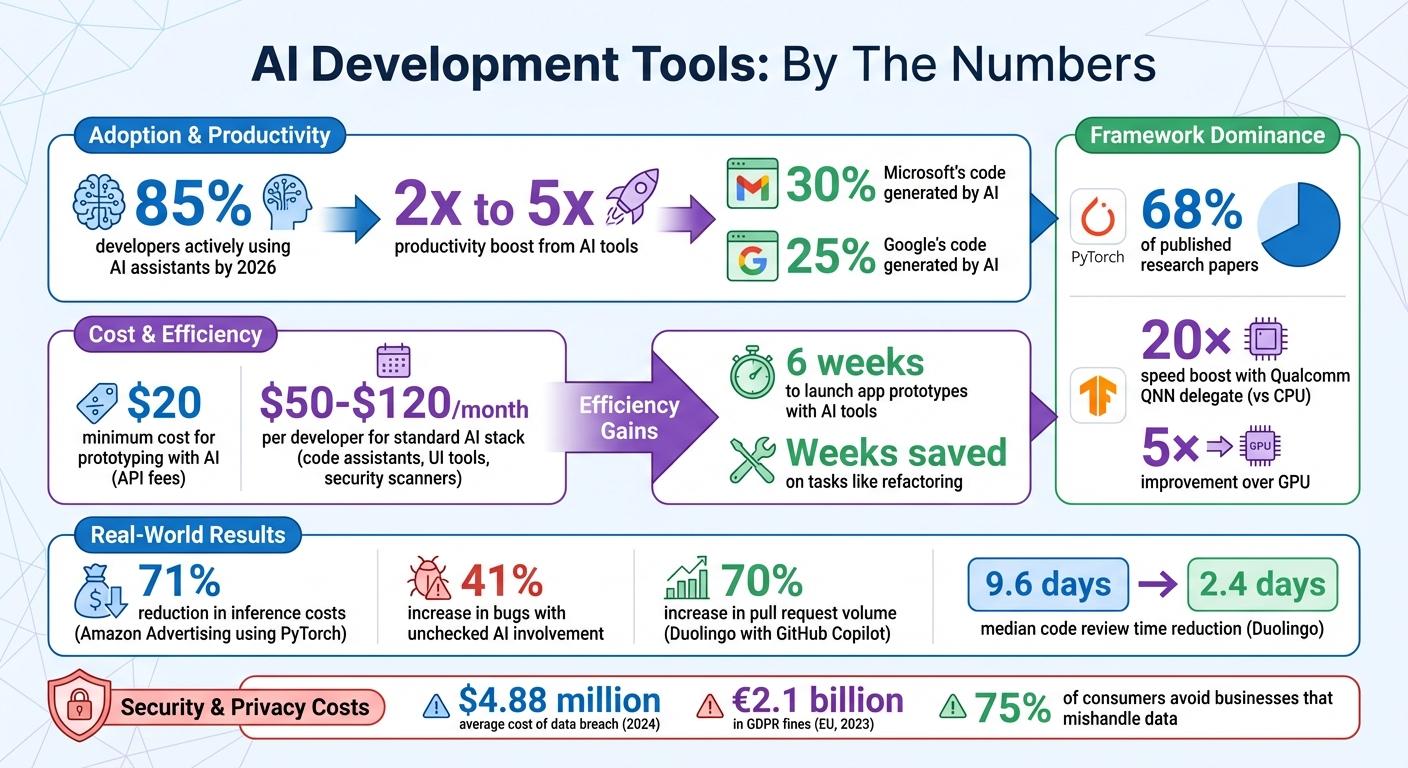
Developers are now completing tasks at record speeds, with AI writing significant portions of code. Tools like TensorFlow and PyTorch streamline complex processes like model deployment and prototyping. By 2026, 85% of developers actively use AI assistants, boosting productivity by 2x to 5x. These tools cut coding time, reduce complexity, and enable smaller teams to deliver polished apps quickly.
Key highlights:
- AI in coding: AI generates 30% of Microsoft’s code and 25% of Google’s code.
- Efficiency gains: Developers using AI tools save weeks on tasks like refactoring.
- Cost-effectiveness: Prototyping with AI can be done for as little as $20 in API fees.
- Standard AI stack: Code assistants, UI tools, and security scanners cost $50–$120/month per developer.
AI’s role extends beyond coding, supporting tasks like testing, debugging, and optimization. For entrepreneurs, AI tools make it possible to launch app prototypes in just six weeks. However, human oversight remains critical to ensure quality and avoid errors.
Takeaway: AI tools are accelerators, not replacements. Developers who combine AI with good practices are leading the way.
Key AI Development Tools
TensorFlow: Building and Deploying AI Models
TensorFlow is a leading choice for deploying machine learning models on mobile devices. Its LiteRT component optimizes models by converting them into the .tflite format, making them suitable for phones and tablets. The Task API further simplifies mobile integration, offering a high-level interface for features like image classification, text analysis, and audio recognition.
In October 2024, Google engineers showcased the process of converting Apple's MobileViT model for image classification using the AI Edge Torch library. They transformed the PyTorch-based model into a .tflite format, enriched it with MediaPipe Tasks metadata, and deployed it on Android for on-device classification. TensorFlow's hardware acceleration capabilities stand out - using the Qualcomm QNN delegate with LiteRT, it achieves a 20× speed boost over CPU performance and a 5× improvement over GPU.
Although TensorFlow dominates mobile deployment, PyTorch continues to be the go-to framework for research and prototyping.
PyTorch: A Flexible Framework for Developers

PyTorch plays a significant role in AI research, featuring in 68% of published research papers. Its design, which emphasizes a "Pythonic" approach and dynamic computation graphs, makes it feel like writing standard Python code. As Jeremy Howard, co-founder of fast.ai, explains:
PyTorch feels like writing Python, while TensorFlow feels like using a framework. For rapid prototyping and research, that difference is significant.
For mobile deployment, PyTorch offers ExecuTorch, which includes Java/Kotlin API bindings, Android integration, and compatibility with platforms like XNNPACK, Qualcomm AI Engine, and Vulkan. A notable example of its scalability comes from Amazon Advertising, which reduced inference costs by 71% by using PyTorch and TorchServe alongside AWS Inferentia. Additionally, AI Edge Torch allows PyTorch models to be converted directly into the LiteRT format, supporting over 70% of core aten operators and validated across more than 70 models.
AutoML: Automated Machine Learning Model Creation
For developers without extensive data science expertise, automated solutions like AutoML simplify the process of creating AI models. AutoML handles tasks such as model selection, hyperparameter tuning, and training, making it easier to integrate AI into applications.
One standout tool is NVIDIA TAO, a low-code AI toolkit built on TensorFlow and PyTorch. It provides access to over 100 pre-trained models and offers features like automated hyperparameter tuning, pruning, and quantization-aware training. NVIDIA describes it as:
NVIDIA TAO is a low-code AI toolkit built on TensorFlow and PyTorch, which simplifies and accelerates the model training process by abstracting away the complexity of AI models.
AutoML is particularly beneficial for small teams and entrepreneurs looking to quickly develop AI-powered features. While these platforms excel in standard applications like product recognition, content moderation, or personalized recommendations, they may not be the best fit for highly specialized or unique use cases.
sbb-itb-622dc24
How Appeneure Integrates AI Tools into Development
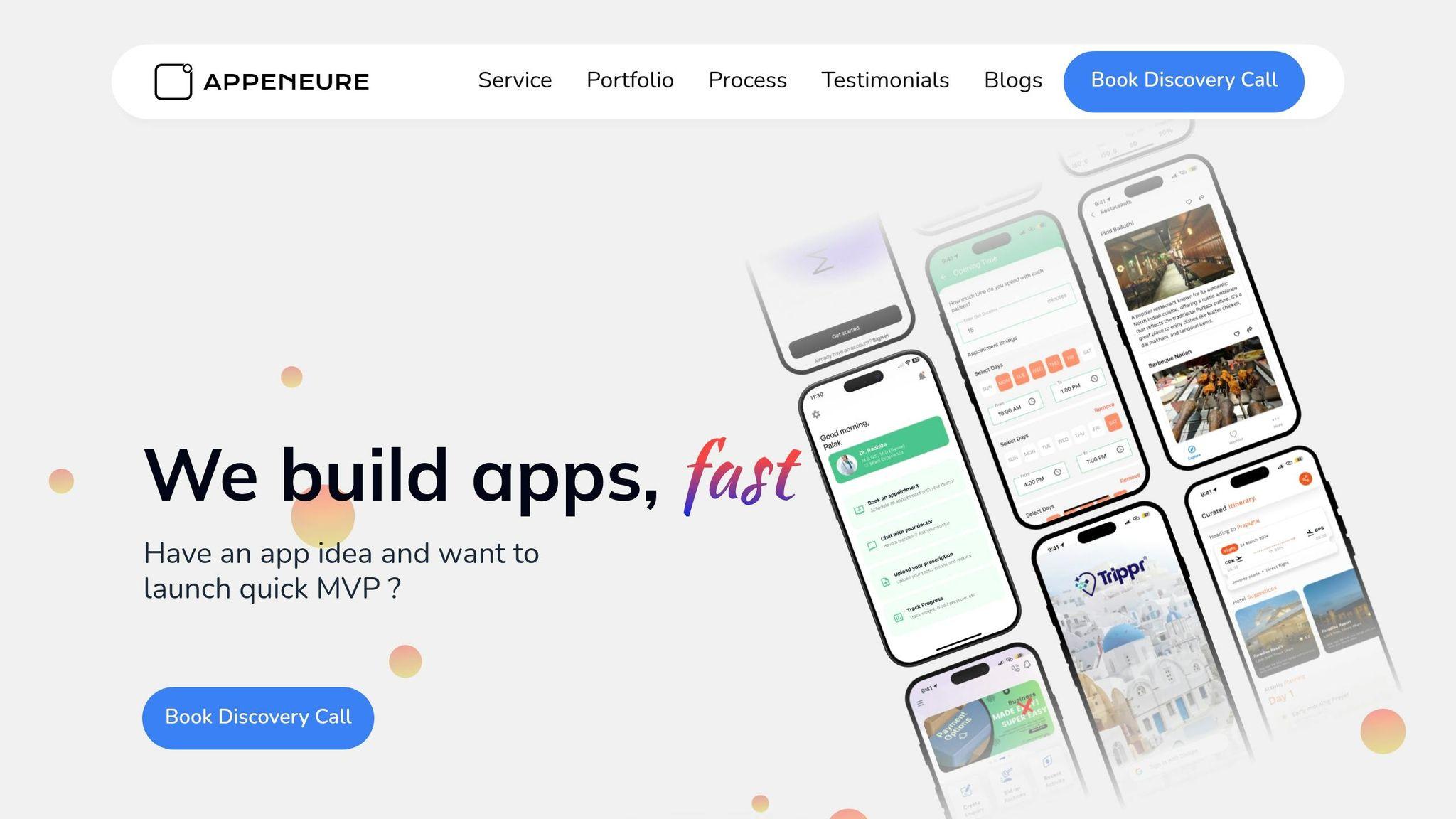
Appeneure's AI Development Workflow
Appeneure has crafted a well-organized development process that seamlessly incorporates AI tools at every stage, from initial concept to final launch. During the wireframe phase, the team lays the groundwork for AI-driven features such as personalized itineraries and intelligent recommendations, ensuring these elements are central to the user experience. When it’s time to build prototypes, they rely on PyTorch to facilitate rapid prototyping and debugging, enabling them to move quickly and efficiently.
For production-ready applications, the focus shifts to TensorFlow, paired with TensorFlow Serving and LiteRT, which helps ensure the apps are scalable and ready to handle real-world demands. To further accelerate development, the team taps into Hugging Face’s extensive library of over 500,000 pre-trained models. These models are particularly useful for tasks like natural language processing and computer vision, significantly cutting down on development time. Rigorous cross-platform testing ensures that AI features not only perform as intended but also meet high standards for security. Finally, the launch process is carefully coordinated to deliver a smooth and polished user experience.
This methodical approach allows Appeneure to deliver AI solutions that are both efficient and tailored to client needs.
Custom AI Apps for Small Teams and Entrepreneurs
Appeneure has carved out a niche in developing Minimum Viable Products (MVPs) for entrepreneurs and small teams who require AI-powered features but lack the resources for a full-scale data science operation. Their expertise spans a variety of industries. For instance, Kumbh Saathi offers AI-powered itineraries and real-time updates to enhance travel planning, while Trippr provides intelligent navigation and translation services. MapOut focuses on career development with data-driven advice, and GyneAssist supports gynecological health tracking.
AI Development Workflow: Prototyping to Deployment
Building and Testing AI Features During Prototyping
During the prototyping phase, it's essential to define the specific problem your AI will address - whether it's powering a chatbot, providing recommendations, recognizing images, or delivering predictive analytics. This clarity keeps your development efforts focused and avoids unnecessary distractions.
To speed up development, consider using pre-trained models from platforms like TensorFlow Hub or Apple's Core ML gallery. These models let you quickly test AI capabilities, sometimes in just a few days. For instance, if you're developing a travel app with photo recognition, integrating a pre-trained vision model can help you gauge user reactions before investing in a custom-built solution.
Selecting the right technology stack early on is equally important. For iOS apps, Core ML is ideal as it leverages Apple's Neural Engine, while TensorFlow Lite is better suited for Android or cross-platform applications. If you're targeting multiple platforms, frameworks like Flutter or React Native can provide additional flexibility.
Data preparation is another critical step. Ensure your data is clean and of high quality, and always test your prototype on real devices rather than relying solely on emulators. This approach helps you capture actual hardware performance.
Once the prototype's basic functionality is in place, it's time to move on to detailed testing and refinement.
Testing and Refining AI Models
After a promising prototype is built, shift your focus to thorough testing using task-specific metrics tailored to your AI's purpose. For example, vision models can use Fréchet Inception Distance (FID) to measure perceptual realism, while language models might rely on metrics like ROUGE-L to assess semantic accuracy. Additionally, keep an eye on latency, measured in milliseconds, to ensure your AI performs efficiently in production.
Consistency in testing is key. Set fixed seeds in Python, NumPy, PyTorch, and TensorFlow to ensure reproducible evaluations, which are essential for comparing model iterations or troubleshooting issues.
Testing on physical devices is non-negotiable. Cloud-based device farms, featuring popular models like the Samsung Galaxy S24 and Google Pixel, can help you evaluate performance across different hardware configurations. Keep in mind that chipsets - whether NPUs, GPUs, or CPUs - can significantly impact performance. A model that works seamlessly on a flagship device might struggle with battery life or overheating on mid-range hardware.
To optimize for mobile platforms, use quantization techniques. Reducing model weights from 32-bit floats to 8-bit integers can shrink the model size by four times with minimal impact on accuracy.
"AI-generated UI code is usually correct. AI-generated business logic needs skepticism." – myougaTheAxo
For a well-rounded testing strategy, follow a testing pyramid approach: allocate about 70% of your tests to unit tests (covering business logic and state transitions), 20% to integration tests (focusing on APIs and data layers), and 10% to UI tests.
Launching AI-Powered Apps
Once testing and optimization are complete, it's time to deploy your AI features. Unlike standard mobile releases, deploying AI-powered apps involves shipping both the code and the model, each with its own update cycle and potential failure points. Convert your models into mobile-friendly formats such as TorchScript (.ptl) for PyTorch, TensorFlow Lite (.tflite), or Core ML (.mlmodel) for iOS.
To improve startup performance, use Ahead-of-Time (AOT) compilation for your target chipsets. This reduces initialization time, enabling faster app launches, especially when leveraging NPU acceleration. You can also implement lightweight "warm-up" runs during cold starts by performing a few dummy inferences. This helps pre-compile kernels and populate caches, reducing perceived latency.
Run inference on a background thread to avoid UI lag, and include fallback mechanisms like default actions or cloud-based API calls for cases where on-device predictions are uncertain.
When rolling out AI features, start with a subset of users. This staged approach helps identify silent model failures or performance issues before a full-scale release. Keep an eye on prediction confidence levels and user engagement, as models can degrade over time even without updates.
"There is no crash report for a model returning subtly wrong predictions." – Devin Rosario, AI Mobile App Deployment Guide
Finally, test performance on low-end devices within your target audience. Just because an app runs smoothly on premium hardware doesn't mean it will perform well on budget phones. Users with lower-end devices may experience issues like battery drain or slow performance that weren't apparent during development. To stay ahead, monitor for data drift using tools that detect when real-world inputs differ significantly from your training data, signaling the need for retraining.
Best Practices for Building AI-Powered Mobile Apps
Designing AI Features Around User Needs
Start by pinpointing the specific problem your AI is solving for users. Prioritize privacy by default - process sensitive data directly on the device to build trust and ensure offline functionality. To manage latency, consider streaming results progressively so users see updates in real time.
Adopt a hybrid approach where simpler tasks are handled locally, and more complex computations are processed in the cloud. Offer users a clear choice between "Local-only" mode (for maximum privacy) and "Cloud-augmented" mode (for better performance). Use clear, simple explanations like: "This feature processes your photos on your device and does not send them to our servers."
Design your interface to respect hardware and battery limitations. Use feature detection at startup (e.g., navigator.gpu for WebGPU support) to assess device capabilities and enable appropriate AI features. For devices with low battery, automatically reduce inference frequency or switch to lighter models. These strategies ensure your app remains functional, efficient, and user-friendly.
Building Scalable AI Solutions
Once your AI features address user needs, focus on scaling them effectively for real-world use.
Efficient task routing is key: lightweight models can handle the majority of requests, while more advanced models are reserved for complex tasks. For example, a lightweight model like GPT-4o-mini (costing around $0.01 per task) can manage simpler queries, escalating only when needed for advanced reasoning.
Streaming responses can significantly improve user engagement. Instead of leaving users waiting for a full response, provide immediate output to keep them engaged. In one case study, reducing AI response latency from 2 seconds to 200 milliseconds using semantic caching increased user retention by 25%. Semantic caching works by storing embeddings of frequently used prompts in Redis, cutting down redundant API calls and saving both time and costs. To handle traffic spikes, use asynchronous processing with tools like Redis or RabbitMQ.
Take inspiration from Duolingo’s success: in July 2025, they deployed GitHub Copilot to their engineering team, reducing median code review times from 9.6 days to just 2.4 days. This change led to a 70% increase in pull request volume, showcasing how AI can boost productivity without requiring larger teams.
Optimize your models by quantizing them - converting model weights from 32-bit floats to 8-bit integers. This can cut inference time by 50% with minimal impact on accuracy. For serverless deployments, reduce cold-start delays by using provisioned concurrency or regional edge deployments. One SaaS app, for instance, reduced backend latency from 210 milliseconds to 96 milliseconds by moving to edge infrastructure, which also led to a 12% drop in crash reports. Efficient scaling not only saves costs but also speeds up development cycles, allowing for faster iterations.
Ethical Considerations in AI App Development
Ethical design is critical for maintaining user trust and ensuring long-term success.
Data privacy is a top concern - 75% of consumers avoid businesses that mishandle their data. Collect only the data you need and delete it once it’s no longer necessary. Instead of "all-or-nothing" consent checkboxes, let users choose what they’re comfortable sharing, such as opting into personalized recommendations versus research participation.
AI models often reflect biases in their training data, which can lead to discriminatory outcomes in areas like hiring or lending. To address this, test your models across diverse user groups and involve teams with varied expertise, including ethicists, to identify and mitigate biases early.
"AI not only replicates human biases, it confers on these biases a kind of scientific credibility. It makes it seem that these predictions and judgments have an objective status." - Michael Sandel, Political Philosopher and Professor, Harvard University
Make your AI transparent. Users should understand why a decision or recommendation was made. For example, instead of vague outputs, provide a simple explanation like: "Recommended because you liked [X]." Avoid treating AI as an opaque system.
For high-stakes decisions - like medical diagnoses, financial advice, or content moderation - require human oversight. Build systems where humans review critical outputs before finalizing actions. Keep detailed logs of model versions and decision-making processes so accountability can be established if issues arise.
Data breaches are costly. In 2024, the global average cost of a data breach reached $4.88 million, and GDPR fines in the EU totaled approximately €2.1 billion in 2023. Regular security audits are essential to identify vulnerabilities and prevent expensive mistakes.
The Full AI Development Workflow (Not Just Code)
Conclusion
AI tools are transforming mobile app development in undeniable ways. Teams that integrate AI into their workflows are gaining a clear edge, while those hesitant to adopt these tools risk falling behind.
Here’s the takeaway: balance is key. AI is fantastic at cutting down repetitive tasks - like managing permissions, navigation, or boilerplate code - which can take up 60-70% of a developer's time. But relying too heavily on AI without thorough human oversight can backfire. In fact, studies show that codebases with unchecked AI involvement can see a 41% spike in bugs. The developers who will thrive by 2026 are those who adopt AI tools strategically while maintaining high standards.
"AI tools are accelerators, not replacements. The developers and teams getting the most from them are those who treat AI assistance as a multiplier for good development practices, not a shortcut around them." - TechTose Guide
Whether you're a solo app creator or part of a larger team, choosing the right tools for your needs is critical. Low-code platforms can speed up early prototyping, AI-enhanced IDEs can streamline full-stack development, and automated testing ensures security and reliability. The key is using these tools in a way that aligns with your goals, while keeping user needs front and center.
FAQs
How do I choose between PyTorch and TensorFlow for a mobile app?
When deciding between PyTorch and TensorFlow, it all comes down to what you need.
PyTorch is known for its user-friendly, research-focused environment, making it a great choice for rapid prototyping and experimentation. On the other hand, TensorFlow shines when it comes to mobile deployment and scalability, thanks to tools like TensorFlow Lite. If you're working on Android or iOS and need optimized performance, TensorFlow Lite often takes the lead. However, PyTorch Mobile is also a solid contender, especially if flexibility and experimentation are key priorities.
Ultimately, your choice should align with your development goals, deployment requirements, and how comfortable you are with each tool.
When should I run AI on-device vs in the cloud?
Choosing between on-device AI and cloud AI comes down to what you need in terms of performance, privacy, and the specific application.
On-device AI is great for tasks that demand quick responses, like augmented reality filters or voice recognition. It works offline, keeps latency low, and offers better privacy since data stays on the device.
Cloud AI, on the other hand, shines when handling resource-heavy tasks. Think of large language models or analyzing vast amounts of data - these require the kind of computing power that only the cloud can provide.
Many developers opt for a hybrid setup. This way, they can strike a balance between speed, cost, and privacy, tailoring the solution to their needs.
How can I cut latency and battery drain for on-device AI?
To make on-device AI faster and less taxing on battery life, consider using frameworks like TensorFlow Lite or Core ML, which are designed for efficient mobile inference. Focus on optimizing your models with methods like quantization to reduce their size and complexity. Lightweight models, such as MobileNet, are great options for balancing performance and efficiency.
Take advantage of hardware acceleration features, like neural engines, to further boost speed. Also, ensure efficient memory management and try batching inputs whenever possible. These steps help reduce resource usage while improving overall performance.
More from the studio

