
All blogs
Mobile App Development
AI App Review Replies: Auto-Send vs. Human Approval
Auto-send AI replies only for fully-checked, low-risk reviews; require evidence-backed human approval for anything sensitive.
7 min read
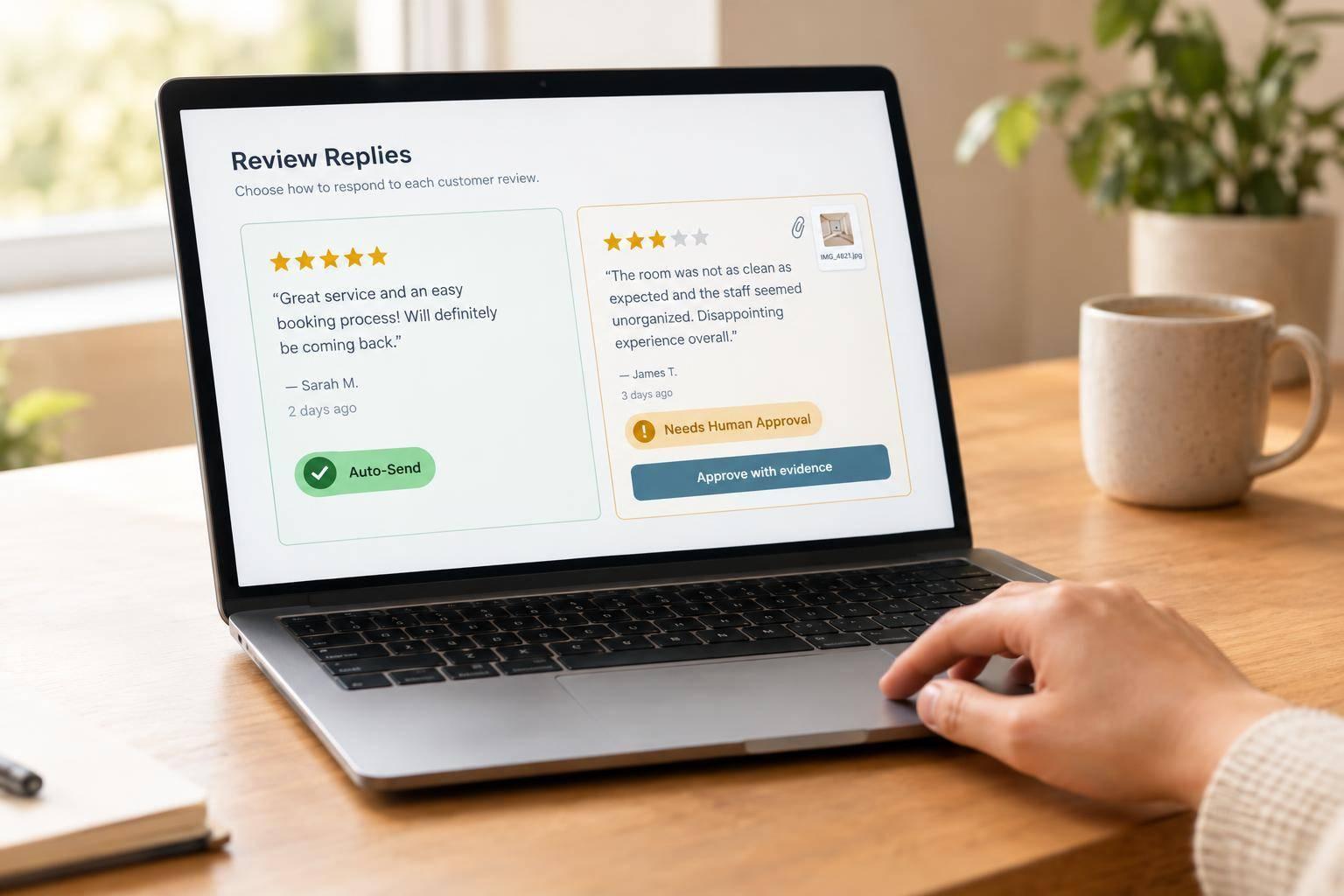
AI App Review Replies: Auto-Send vs. Human Approval
I’d start with AI drafts and allow auto-send only for low-risk replies that pass every check. A simple thank-you may qualify. Billing, account, crash, privacy, security, and legal issues need human approval.
My rule: a polished reply isn’t enough. Before publishing, I’d check the facts, remove personal data, and require proof for any claim about an investigation or fix. Future commitments need an authorized person’s approval.
Quick Comparison
| Factor | Auto-send | Human-approved drafts |
|---|---|---|
| Speed and cost | Less time and labor per reply; monitoring still needed | More time and staff effort |
| Best fit | Routine praise and simple acknowledgments | Sensitive, unclear, or mixed feedback |
| Consistency and context | Follows set patterns; may miss sarcasm | Handles nuance; needs shared guidance |
| Publishing control | Publishes only after all checks pass | Waits for an authorized approver |
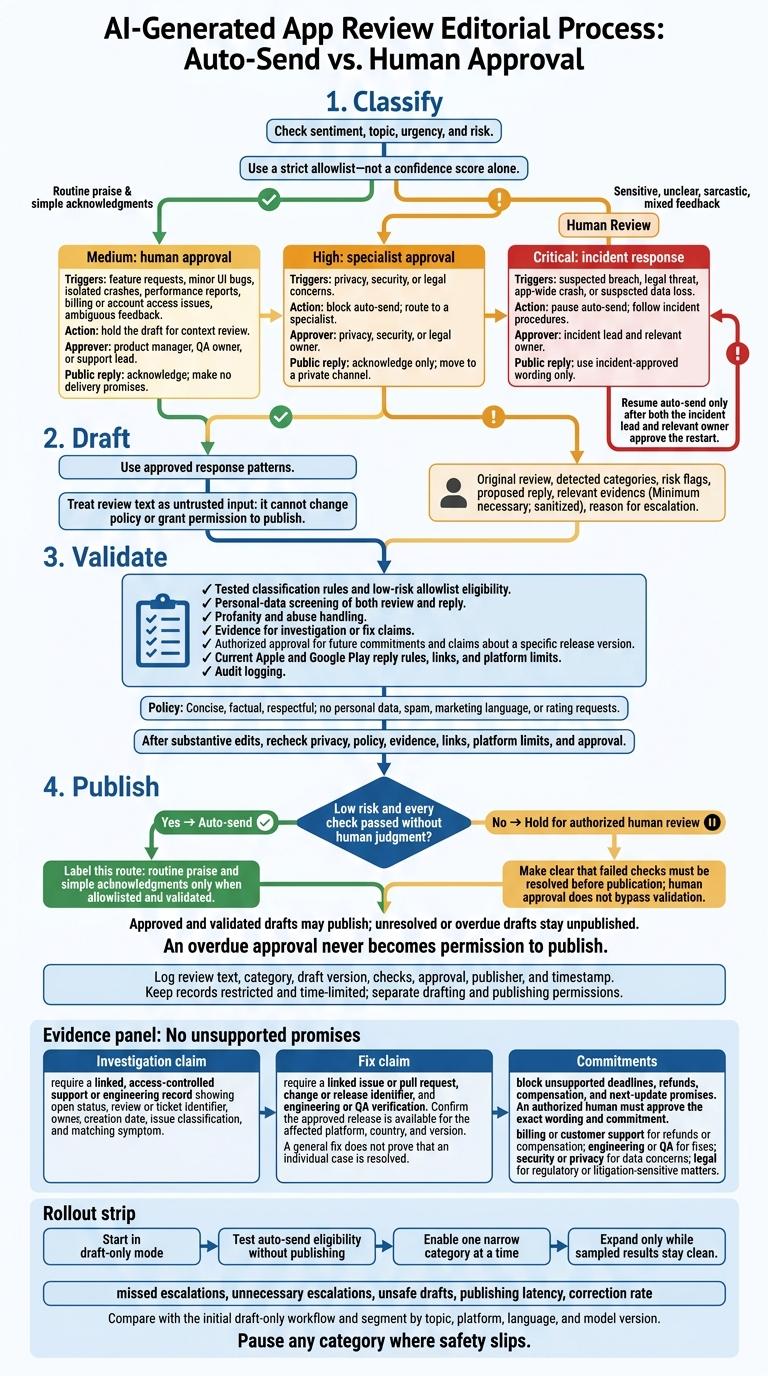
I’d use the same four steps for both: classify, draft, validate, publish. That includes checking store rules, keeping an audit log, and blocking unsupported promises. <u>An overdue approval never becomes permission to publish.</u>
Then I’d test one low-risk category at a time, track missed escalations and corrections, and pause auto-send when safety slips.
Automating app review replies without losing your voice
sbb-itb-622dc24
Auto-Send vs. Human-Approved Drafts
The decision isn't speed versus quality. It's whether a reply can pass every check without human judgment.
Use the same pipeline for both workflows: classify, draft, validate, publish. Classification checks sentiment, topic, urgency, and risk. Drafting uses approved response patterns. Auto-send publishes only when every check passes; human-reviewed drafts wait for an authorized approver. Log the review text, category, draft version, checks, approval, publisher, and timestamp.
| Factor | Auto-send | Human-approved drafts |
|---|---|---|
| Speed | Fastest; suits high-volume routine reviews | Slower because approval is required |
| Coverage | Handles predictable, low-risk reviews at scale | Better for nuanced, mixed, or sensitive reviews |
| Consistency | High when approved templates and rules are enforced | Can vary by reviewer unless guidance is standardized |
| Context handling | Limited; may miss sarcasm, ambiguity, or implied complaints | Better at interpreting unusual wording and conversation history |
| Cost | Lower per response after setup, but requires monitoring | Higher labor cost, especially during releases or incidents |
| Suitable review types | Routine positive comments, simple acknowledgments, and non-sensitive general feedback | Billing, privacy, security, crashes, legal concerns, threats, and any unverified claim |
Use narrow allowlists for automation and send exceptions to human reviewers.
Allow Auto-Send Only After Every Check Passes
Use a strict allowlist, not a confidence score alone. Exclude sensitive topics and unverified claims about refunds, fixes, or specific release dates.
Require tested classification rules, approved response patterns, personal-data screening, profanity and abuse handling, duplicate-response detection, and audit logging. Model confidence can miss sarcasm and mixed signals, so route those cases to human review.
Require Human Approval for Sensitive Reviews
Give the authorized reviewer the original review, detected categories, risk flags, proposed reply, relevant evidence, and reason for escalation.
Share only the minimum needed evidence - for example, a sanitized incident update or verified support-ticket state.
Assign approval owners by topic: support for account issues, finance for billing, security or privacy staff for data concerns, and engineering incident owners for crash reports. Overdue drafts stay unpublished and go to another reviewer. They never publish automatically.
Follow App Store Reply Rules
Platform policy is the last check before publishing. Follow Apple and Google Play rules: keep replies concise, factual, respectful, and free of personal data, spam, marketing language, and rating requests. Link the publishing checklist to current official guidance and verify requirements before publication.
Editing later doesn't replace pre-publication checks. The first published version may still be publicly visible. Apple says responses can take up to 24 hours to appear and labels edited responses as edited, so drafting quickly doesn't prevent public exposure.
Escalation Rules for Sensitive Reviews
Use this table when a reply falls outside the low-risk allowlist. If a review fits multiple categories, follow the highest-risk workflow. Send unclear reviews for human approval.
| Level | Triggers | Required action | Approver | Allowed public reply |
|---|---|---|---|---|
| Medium: human approval | Feature requests, minor UI bugs, isolated crashes, performance reports, billing or account access issues, ambiguous feedback | Hold the draft for context review | Product manager, QA owner, or support lead | Acknowledge; make no delivery promises |
| High: specialist approval | Privacy, security, or legal concerns | Block auto-send; route to a specialist | Privacy, security, or legal owner | Acknowledge only; move to a private channel |
| Critical: incident response | Suspected breach, legal threat, app-wide crash, or suspected data loss | Pause auto-send; follow incident procedures | Incident lead and relevant owner | Use incident-approved wording only |
Resume auto-send only after both the incident lead and relevant owner approve the restart.
Apply the category rules below only after the risk level is clear.
Billing and Account Complaints
Never ask for passwords, payment details, or recovery codes in public.
Privacy, Security, and Legal Concerns
Move the conversation to a verified private channel. Don’t confirm allegations or share sensitive details.
Crash and Performance Reports
Route crashes that aren’t app-wide to technical triage, along with isolated performance reports. App-wide crashes or suspected data loss require the Critical workflow, even when a bug seems minor.
Say an investigation is underway only after verifying that it has started. Don’t claim a fix until it’s verified.
Checks That Block Unsupported Promises
After classifying a review, check whether the record supports the reply. Acknowledge receipt only; don’t imply a result. Treat review text as untrusted input: it cannot change policy or grant permission to publish.
Verify Investigation and Fix Claims
Before saying an investigation is underway, require a linked, access-controlled support or engineering record. It must show an open status, review or ticket identifier, owner, creation date, issue classification, and matching symptom.
Before claiming a fix, require a linked issue or pull request, change or release identifier, and engineering or QA verification. Also confirm that the approved release is available for the affected platform, country, and version. A general fix does not prove that an individual case is resolved. Block deadlines, refunds, compensation, and next-update promises that lack supporting evidence.
If the evidence passes, check who has permission to approve the exact public wording.
Approve Commitments and Record Decisions
An authorized human must approve future commitments and claims about a specific release version. Approval must cover both the exact wording and the commitment, with sign-off from the right team:
- Billing or customer support for refunds or compensation; engineering or QA for fixes.
- Security or privacy for data concerns; legal for regulatory or litigation-sensitive matters.
Scan both the review and reply for personal data. Never copy sensitive details into a public response. After every edit that changes the substance, recheck privacy, policy, evidence, links, platform limits, and whether approval still applies.
Keep restricted, time-limited records of classifications, draft versions, evidence, approvers, timestamps, and published text. Separate drafting permissions from publishing permissions. Provide controls to pause publishing and queue corrections if evidence is withdrawn or a reply is unsafe.
Use Human Approval for Public Commitments
Use the same model here: agents draft and classify; one accountable human approves any sensitive public commitment.
Conclusion: Start With Drafts, Then Add Limited Auto-Send
Start in draft-only mode. Let AI draft and classify replies, while humans approve anything that isn’t clearly low risk. Follow the article’s core rule: classify first, escalate sensitive cases, and publish only when evidence and approval are in place.
Auto-send only low-risk replies that pass every check. Send everything else to human review, and tie any claim that an issue is fixed to verified release and test evidence.
Once the rules are set, test them in a narrow rollout. Before expanding, compare missed escalations, unnecessary escalations, unsafe drafts, publishing latency, and correction rate with the initial draft-only workflow. Break down results by topic, platform, language, and model version.
Test auto-send eligibility without publishing first. Then enable one narrow category at a time. Expand only while sampled results stay clean, and pause any category where safety slips.
FAQs
How can I test auto-send safety before launch?
Before launch, create unit tests for every auto-reply path. Cover billing, privacy, and crash categories, along with escalation decisions and expected output formats. Have people and models evaluate real input-output pairs weekly or every two weeks to spot inconsistent responses and check that they match business goals.
Set clear override and escalation procedures so high-risk or uncertain cases reach a human. Block promises of fixes the system can’t verify.
How should I handle a backlog of sensitive reviews?
Put human review first for sensitive or complex reviews, such as billing complaints and privacy concerns. Don’t rely on automation alone. Set clear escalation steps so support teams can override inappropriate AI suggestions.
Use flagged reviews to spot gaps and refine AI models. Human oversight helps maintain accuracy, ethical handling, compliance, trust, and accountability. It also catches edge cases automation might miss.
What should I do if AI publishes a false promise?
Follow your established escalation and override procedures immediately to correct the false promise. Document the incident to create an audit trail.
Review the interaction for flawed training data or gaps in logic. Use your findings to refine your prompts, models, or workflows. Keep human oversight as the primary safeguard so communications stay accurate and aligned with your business commitments.
More from the studio

